
To migrate an affiliate program, export your partners, their referred customers and their balances from the old tool and import them in that order. Then run both tools for one cookie window so clicks from before the switch still count. The import takes an afternoon, and the overlap usually lasts 30 to 60 days.
This guide comes from the Rewardful, FirstPromoter, Tolt, PartnerStack, Stripe and IRS docs, all checked in November 2026. One thing to know first: we make OpenPromoter, and its importer gets one section near the end. The records, the steps and the cutover rules apply to any pair of tools.
You get the six records to export and the six steps in order. After that come keeping old links working, paying each commission once, the email to partners and the tax records to keep.
What Moves Over When You Migrate an Affiliate Program
When you migrate an affiliate program, six records have to move with it. They are partners with codes, referred customers, unpaid balances, paid totals, coupon codes and status. Lose the customers and renewals pay nobody, and lose the codes and old links stop counting.
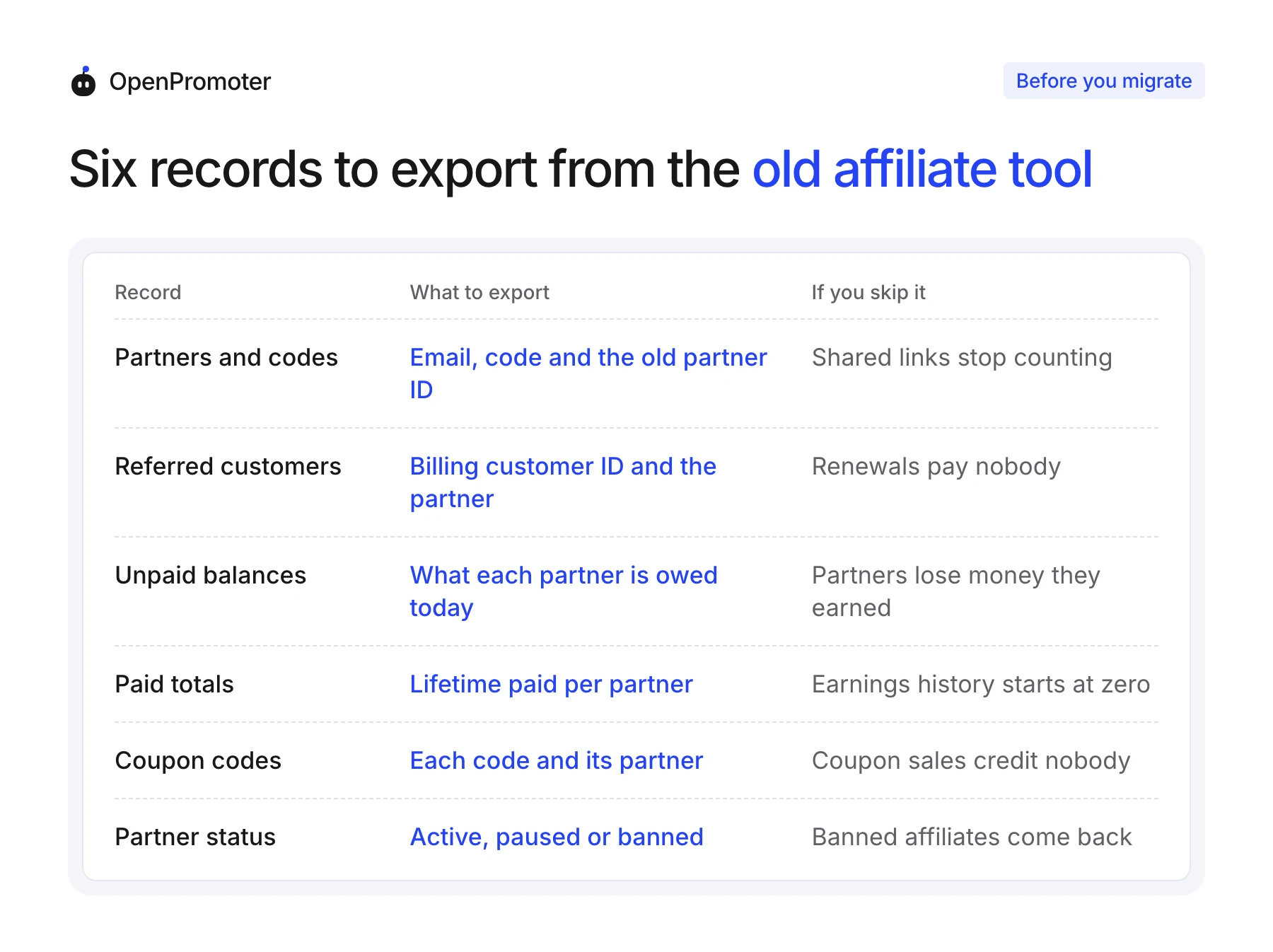
Partners are the easy part, since every tool exports a list with emails. The trouble starts with the records that tie money to a partner, because importers skip them more often than founders expect.
Rewardful's own help page says "we currently do not import historical invoices and commissions" when you move into Rewardful (Rewardful import guide). PartnerStack's data importer drops a transaction "without a corresponding customer record." So count rows before and after every import, and treat a gap as a missing partner payment.
The referred customer is the record that keeps paying. Your billing system knows each customer by an ID.
In Stripe that is the cus_ value the Customer object calls its "unique identifier for the object." Export that ID with the partner it belongs to, and renewals months later can still credit the right person.
Status matters more than it looks. A partner you banned for fraud in the old tool should arrive banned in the new one. If the import marks everyone active, you have quietly rehired the people you fired.
How Do I Switch Affiliate Platforms? Six Steps
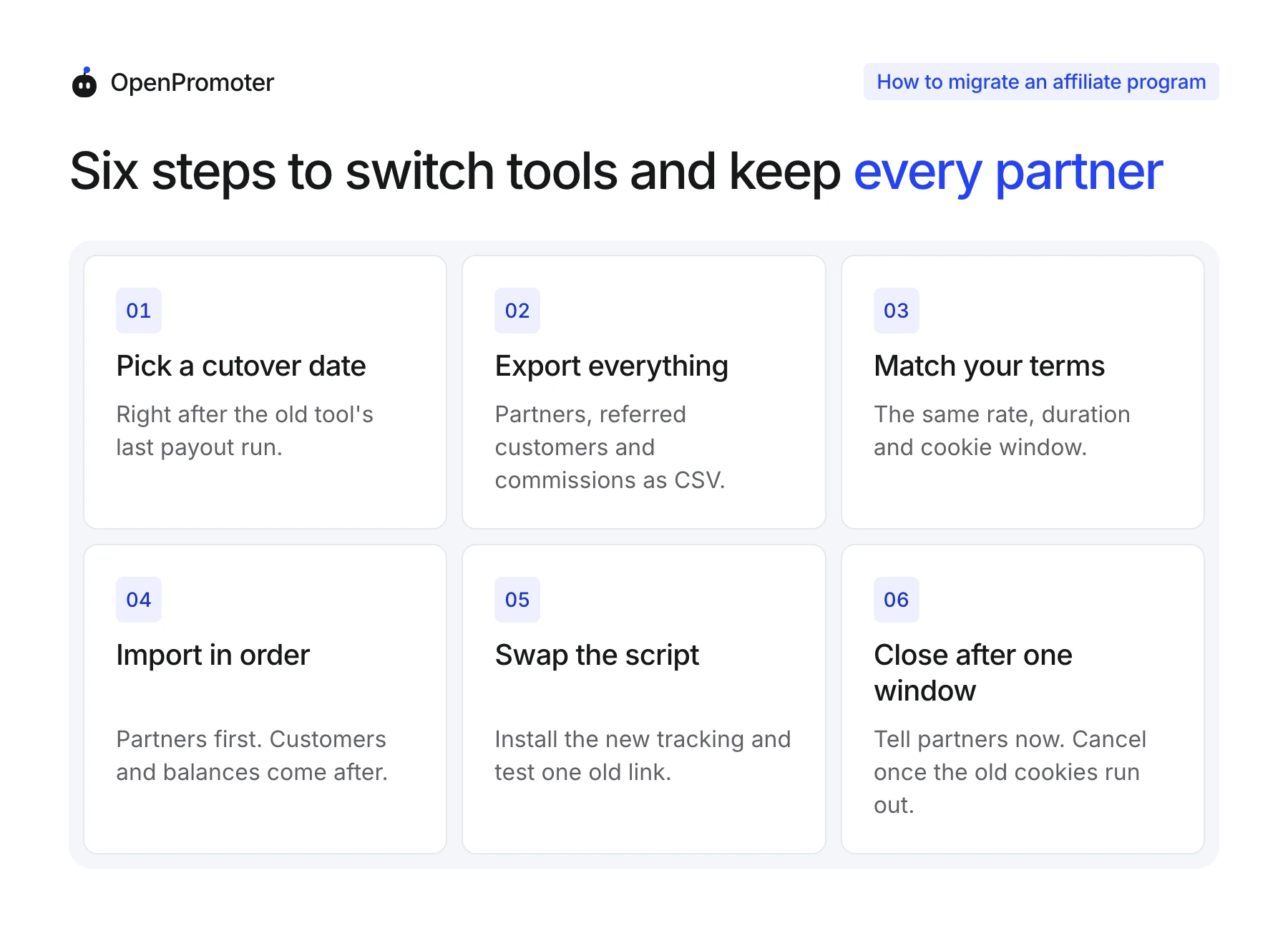
You switch affiliate platforms in six steps: pick a cutover date, export everything, match your terms and import in order. Then swap the tracking script and close the old account after one cookie window. Each step guards the next one, so run them in this order.
The order matters most at the two ends. A cutover date chosen at random leaves commissions half paid in the old tool. Closing the old account too early drops every click that still sits in a partner's cookie.
Here are the six steps:
- Pick a cutover date: Choose the day right after the old tool's last payout run. Fewer commissions are in flight, and the balance file you export that day is final.
- Export everything: Download partners, referred customers and commissions or balances as CSV. Keep the old tool's partner ID column, since some customer files name partners only by that ID.
- Match your terms: Set the same commission rate, duration and cookie window in the new tool. A partner on 30% recurring should not wake up on 20% one time.
- Import in order: Bring in partners first. Customers and balances come after, because both point at partners that must already exist.
- Swap the script: Install the new tracking on your site and test one old partner link end to end. Buy through a test checkout and confirm the right partner gets the commission.
- Close after one window: Tell partners the date now, and keep the old tool running until its cookies run out. Cancel only after its last commissions are paid.
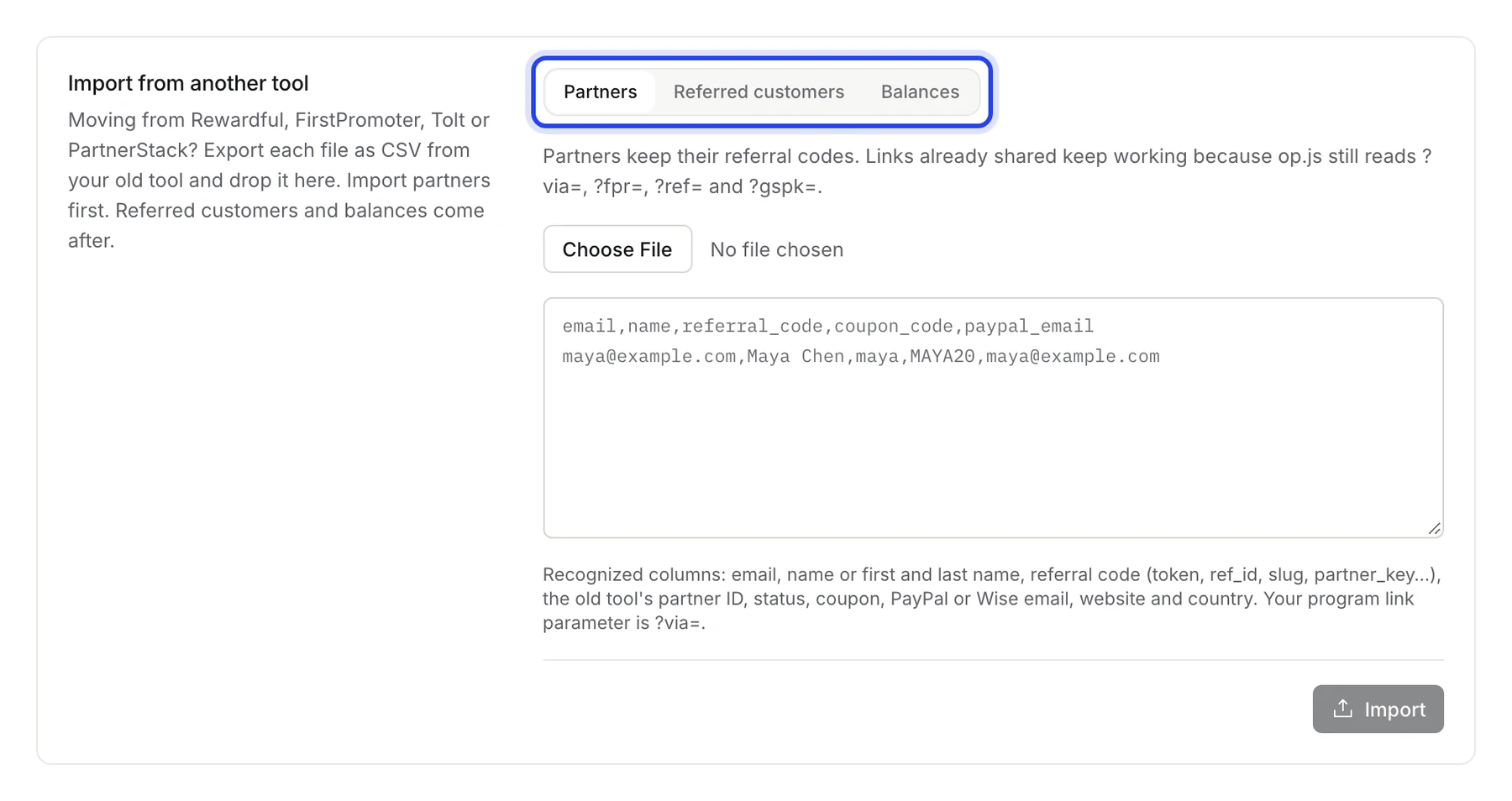
The import step deserves the most care, because a wrong column quietly drops money. Every importer reads column names. Open each CSV first and check that emails, codes and customer IDs sit in columns with plain names.
Then read the result line by line. A good importer tells you how many rows came in, how many it skipped and why each skipped row failed.
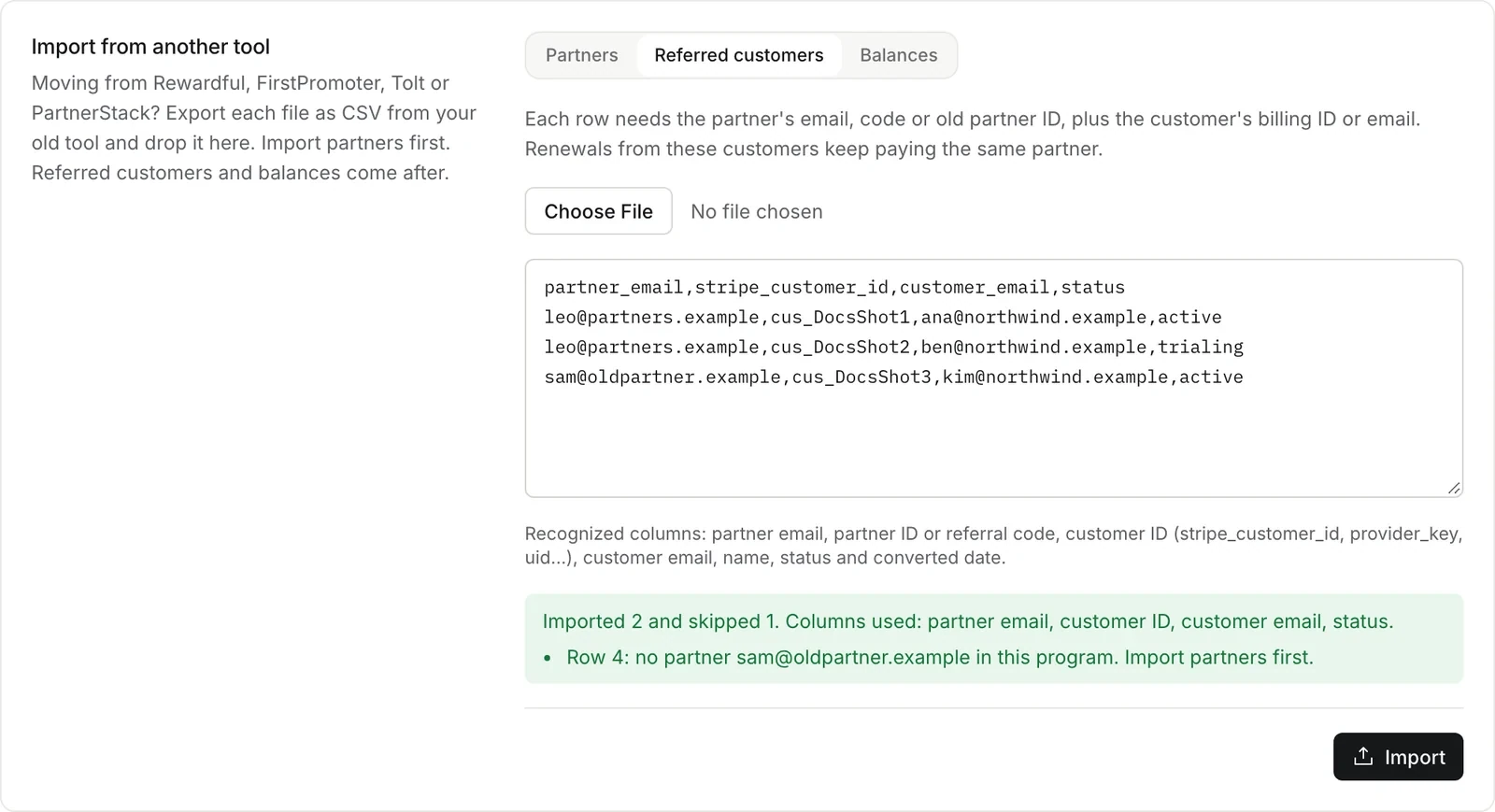
A skipped row is a decision waiting for you. A missing partner usually means the partner file left that person out, so import them and run the customer file again.
The test purchase in step 5 is the easiest step to skip under deadline pressure. It is short, and it catches a missing script or a commission rate typed as 3% when you meant 30%.
Run it with a link you know a partner already shared. That tests the real path, and a fresh link from the new tool proves nothing about the old ones already out there.
How to Keep Old Links Working When You Switch Affiliate Software
Old links keep working when you switch affiliate software if the new tool reads the old link parameter and each partner keeps their code. Rewardful links use ?via=, FirstPromoter uses ?fpr= and Tolt uses ?ref=. The new tracking script has to recognize those and match the code to the imported partner.
The second half of the job is the cookie. A visitor who clicked a partner link last week carries the old tool's cookie. That click belongs to the old tool until the cookie runs out.
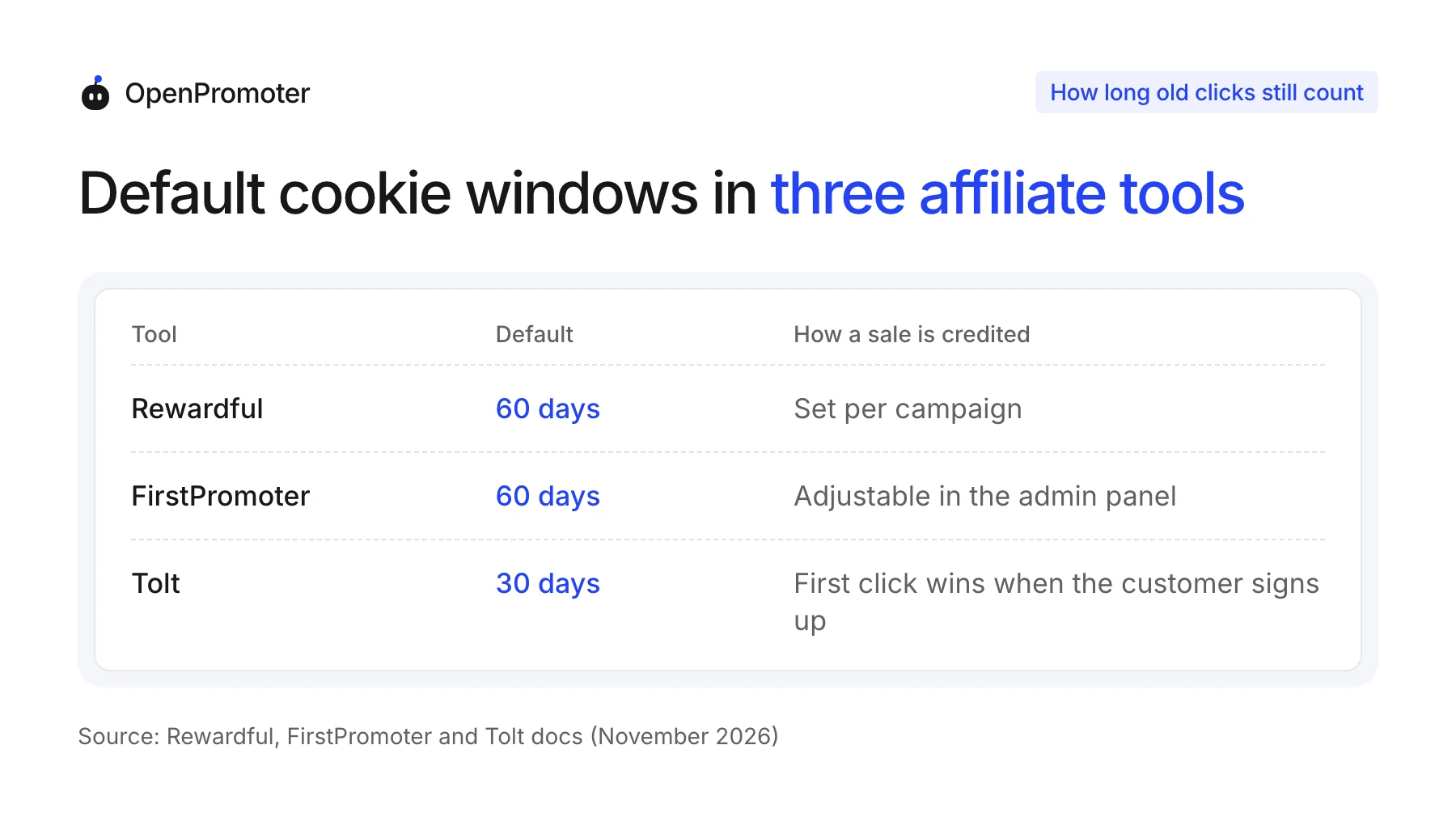
Rewardful sets "a standard 60-day cookie retention policy" by default and lets you change it per campaign (Rewardful cookie docs). FirstPromoter's cookies have "a default lifespan of 60 days," adjustable in its admin panel (FirstPromoter docs).
Tolt works differently. Its attribution docs say "first click wins," and the partner is fixed when the customer is created. So import Tolt customers with their partner before anything else touches them.
Set the new tool's cookie window to match the old one during the overlap. A partner whose sale counted for 60 days last month should not lose it after 30 days this month.
Some tools serve partner links from their own domain instead of yours. Those links stop working the day you cancel, whatever the new tool can read.
Check one link from your own program before you plan the cutover. If it points at the old vendor's domain, send partners new links early and give them a few weeks to swap them.
How to Avoid Paying a Commission Twice
You avoid paying a commission twice by deciding, for every unpaid commission, which tool pays it. Either the old tool pays it before you cancel or you import it as a balance into the new one. Never both, and write the choice down before cutover day.
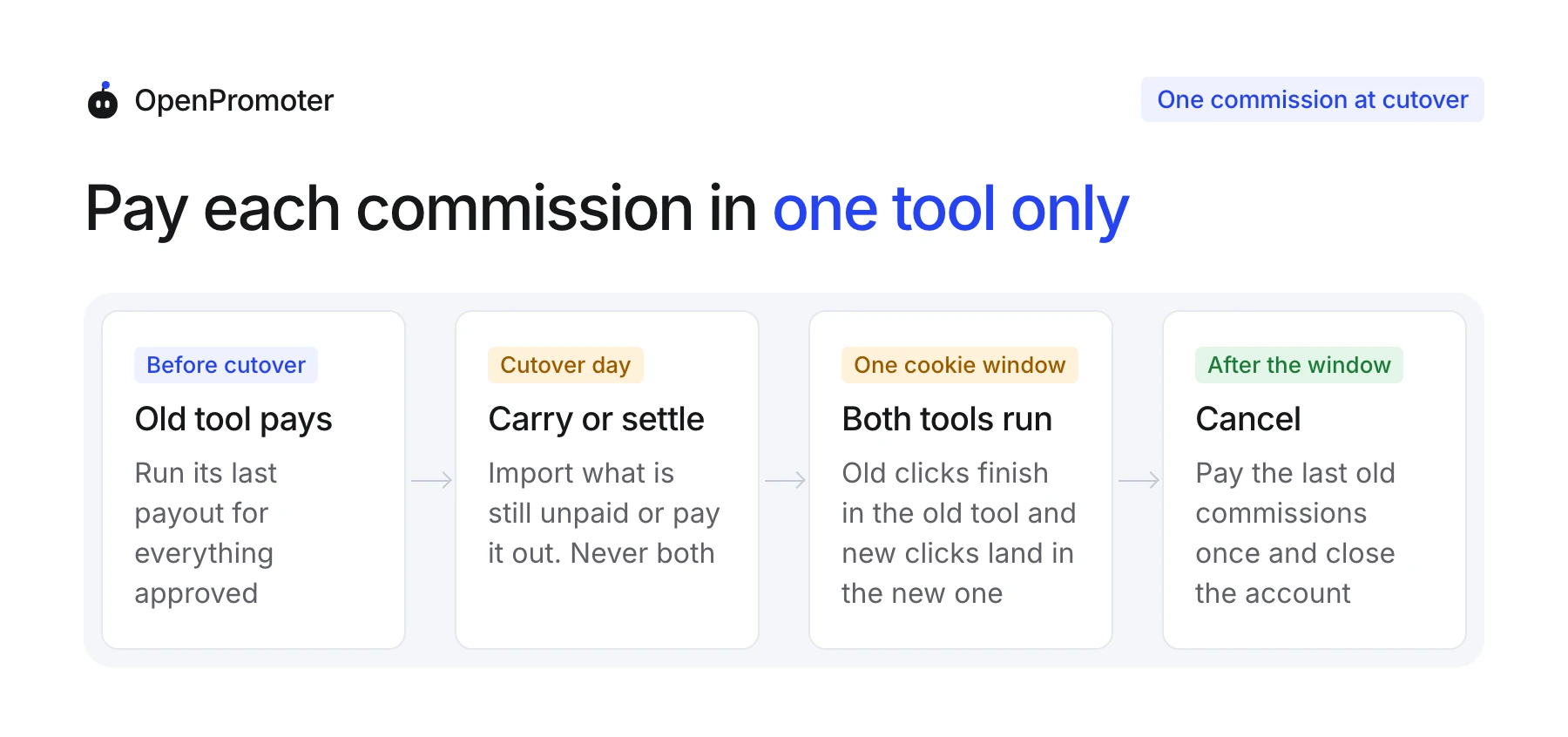
Here is a worked example with round numbers. Say Maya is owed $240 on cutover day and has been paid $1,850 in total by the old tool.
If you import her $240 as an unpaid balance, the new tool pays it in the next payout run. The old tool must then never pay it, so turn off its automatic payouts before you cancel.
If the old tool pays the $240 instead, import only her paid total of $2,090. Her lifetime earnings stay right and nothing is owed twice.
The overlap window adds one more case. A customer who clicked Maya's link before cutover and buys during the window earns her a commission in the old tool. Pay that one from the old tool, and leave it out of any later import.
The clean rule fits on a sticky note: a commission belongs to the tool that tracked the sale. Only the balance on cutover day moves, and it moves exactly once.
What to Tell Your Partners Before the Move
Tell partners the switch date, what stays the same and what they need to do, at least two weeks before cutover. Most of them need to do nothing if links and codes carry over. Say that plainly, because silence makes partners assume their earnings are at risk.
A good announcement covers five things:
- The date: The day new clicks start counting in the new tool.
- Their links: Whether old links keep working or need replacing, with the new link if they do.
- Their money: What they are owed today and which tool pays it.
- The new portal: How to sign in, usually with the same email they already use.
- A contact: One email address for questions during the move.
Send it twice: once two weeks ahead and once on cutover day. The second email is the one partners act on, so put the sign-in link at the top.
Keep the tone matter of fact. A short note that names the date and the money reads as a plan, while a long apology reads as trouble.
Answer the money question with a number. "You are owed $240, and it will arrive in the December 1 payout" settles more nerves than a paragraph about the new features.
Partners who earn the most deserve a personal note. Five minutes on a message to your top ten partners costs less than one of them deciding the program is shutting down.
Taxes and Records After an Affiliate Software Migration
An affiliate software migration splits one year of payments across two tools, so keep every export from the old tool. For 2026 the IRS sets the 1099-NEC threshold at $2,000. A partner paid $1,200 through each tool can cross it when your business is the payer in both.
The IRS 1099-NEC instructions report "$2,000 or more" in nonemployee compensation for 2026. Add the old tool's paid totals to the new tool's before you decide who gets a form. If the old tool filed 1099s for you under its managed payouts, ask your tax advisor how to split the year.
Our 1099-NEC threshold guide covers forms, deadlines and partners abroad.
Collect W-9 and W-8BEN forms again in the new tool if you cannot export them. Tax IDs often stay locked inside the old vendor, and a missing form can hold up a payout.
Ask for the forms in the same announcement email, with a deadline before the first payout from the new tool. A partner who sends the form late simply waits one payout run.
Save one more file before you cancel: the old tool's payout history with dates and amounts. It is the only proof of what each partner received there if a question comes up next spring.
Keep the old exports for as long as your accountant asks, often several years. This is general information and not tax advice, so check your own case with a tax advisor.
How OpenPromoter Handles the Import
OpenPromoter imports all three files in Settings > Import: partners, referred customers and balances. Codes stay exactly as the old tool wrote them, and op.js still reads ?via=, ?fpr=, ?ref= and ?gspk=. Each file goes in whole or not at all.
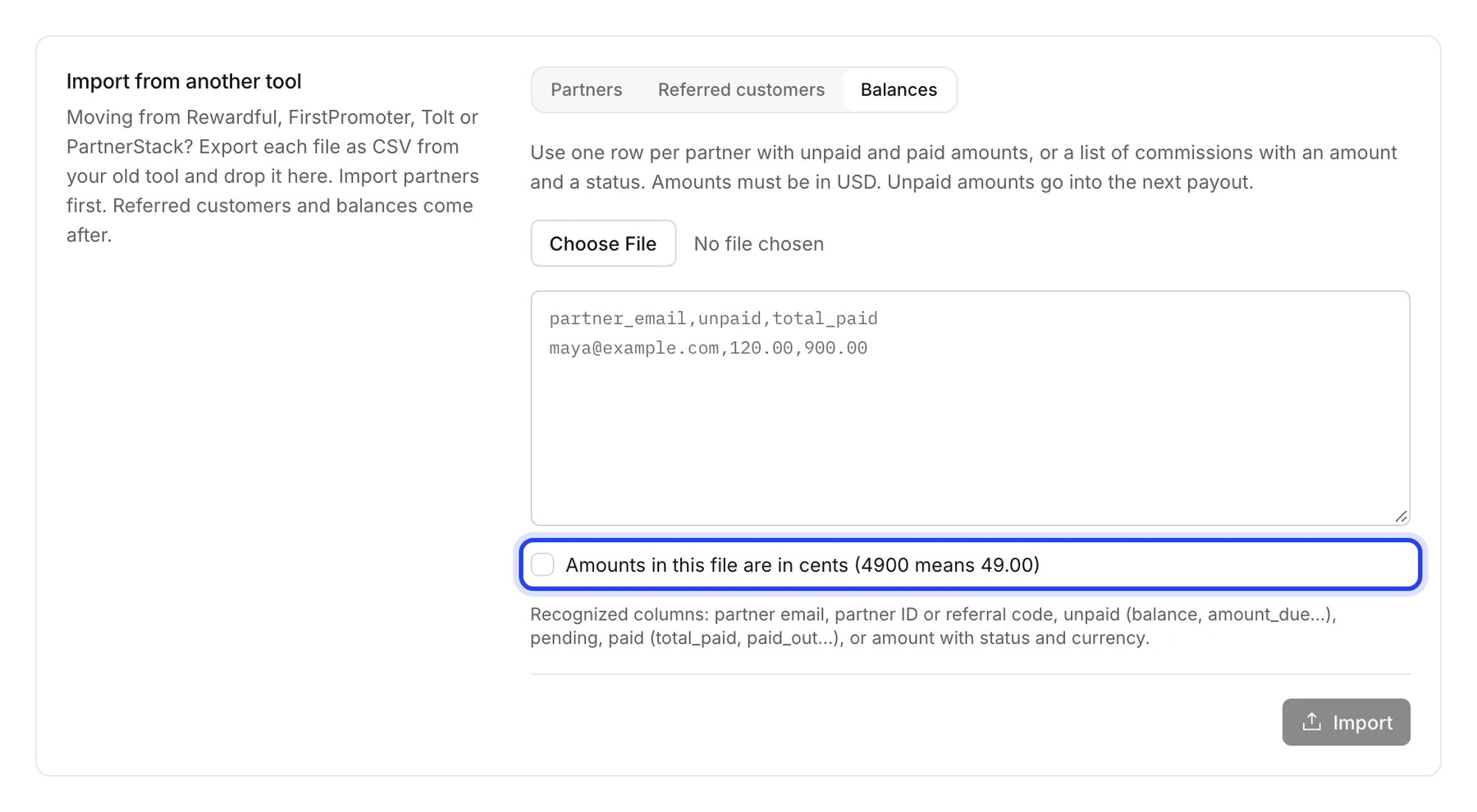
The balances file takes either one row per partner or a list of single commissions with a status. Due and approved amounts join the next payout, pending ones wait out your hold period and paid ones count toward lifetime earnings. Tick the cents box when an API export writes 4900 for $49.00.
Imported customers count as already paid once, so a one-time commission or a first-sale bonus is not paid again. A customer still on a trial earns the usual commission on their first payment.
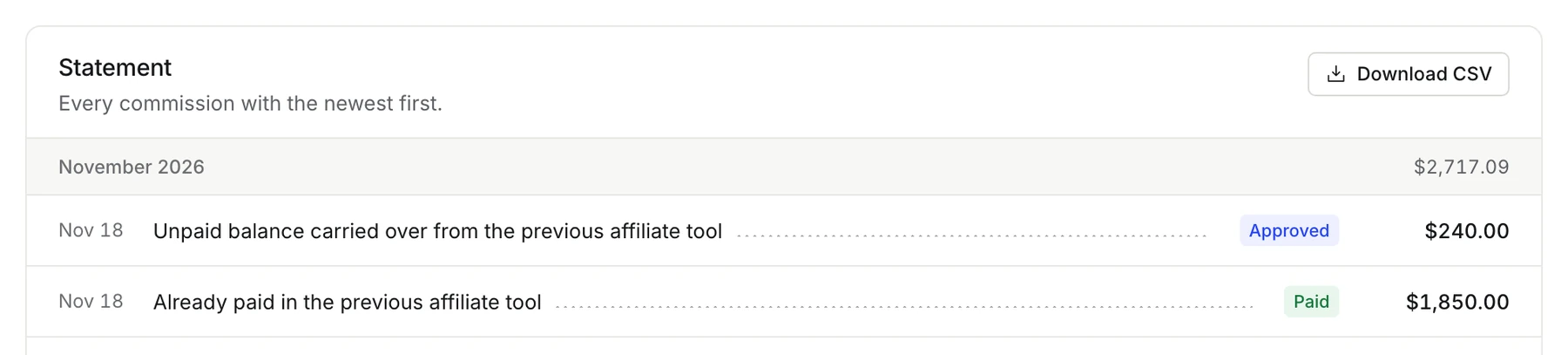
Partners see the carried-over lines on their own statement, labeled for what they are. That answers the first question every partner asks after a move.
It has limits. There is no direct connection to another tool's API, and you work from CSV files. Links served on another vendor's own domain still need replacing.
The import guide lists every column it reads. Our list of affiliate software alternatives covers how the tools differ before you choose where to move.
Conclusion
To migrate an affiliate program without losing partners, move the records that carry money: customers with their billing IDs and balances with a clear owner. Run both tools for one cookie window and pay each commission in one place only.
Test one old link before cutover and tell partners twice. Keep every export for tax season. Done in that order, the move is invisible to the people who matter most: the partners still sending you customers.
Frequently asked questions
How long does it take to migrate an affiliate program?
The export and import take an afternoon for a program with a few hundred partners. The whole move lasts as long as the old tool's cookie window, usually 30 to 60 days. Old clicks keep counting there until their cookies run out.
Do affiliates need new links after a switch?
Not when the new tool reads the old link parameter and partners keep their codes. Links served from the old vendor's own domain are the exception, and partners need new links before you cancel.
Can I import commission history from my old affiliate tool?
Many importers skip it, so check before you plan around it. Rewardful's own import guide covers affiliates and referred customers but not historical commissions. At minimum, import each partner's unpaid balance and paid total.
What happens to pending commissions during the move?
They stay with the tool that tracked the sale. Pay them from the old tool once they clear its refund window. Or carry them over as pending balances that wait out the new tool's hold period.
Can I run two affiliate tools at the same time?
Yes, and you should for one cookie window. New clicks go to the new tool while old cookies finish in the old one. Turn off the old tool's automatic payouts for any balance you import.
Will my Stripe coupon codes keep working?
The codes themselves live in Stripe, so customers can still use them. Import each code with its partner so the new tool credits coupon sales to the right person.
Should I move inactive affiliates too?
Yes, if they have codes in the wild. A partner who has not posted in a year may still have an old blog post sending traffic. Import them with their status so paused and banned partners stay that way.
What should I check after the switch?
Compare partner and customer counts against the old exports, and buy once through an old partner link. Then check the first renewal of an imported customer credits the right partner.