
A Stripe affiliate program is a partner program for your product that runs on your Stripe payments. Partners share a link or coupon, and each paid invoice from a customer they referred becomes a commission. Stripe supplies the payment events, and an affiliate tool reads them, books commissions and prepares payouts.
This guide uses Stripe's own docs and the OpenPromoter docs, all read in November 2026. One thing to know first: we make OpenPromoter. The setup steps use it, and the ideas apply to any tool that reads Stripe.
You get the six setup steps first. After that come how Stripe attribution works, the Stripe events that matter, how partners get paid and what the program costs.
What Is a Stripe Affiliate Program?
A Stripe affiliate program is an affiliate or referral program where Stripe is your billing system. Each sale a partner refers is a Stripe payment, so commissions can follow real paid invoices. That includes renewals, upgrades and refunds that Stripe reports as they happen.
Stripe's payment tools cover coupons and customer credit. They have no partner links, commission rules or payout reports of their own. An affiliate tool adds those on top of the data Stripe already holds.
Does Stripe Have Its Own Affiliate Program?
Stripe publishes separate affiliate terms for people who promote Stripe itself. That program is for earning from referrals to Stripe. A program that pays partners for sales of your own product is a different thing, and it is the one this guide covers.
If you searched to run partners for your SaaS, you are in the right place. If you want to promote Stripe, read Stripe's terms first, since they can vary by region.
How to Set Up a Stripe Affiliate Program
You can set up a Stripe affiliate program in six steps. Connect Stripe, set the commission, add the tracking script and invite partners. Finish with a test purchase and your first payout approval, with each step below shown in OpenPromoter.
The whole setup takes an afternoon for most SaaS products. Test mode in Stripe lets you check each step before real money moves.
Step 1: Connect Stripe
Open Settings > Integrations and click Connect with Stripe and approve access in Stripe. You come back connected. OpenPromoter registers its webhook and imports your products, prices, customers and active subscriptions.
On a self-hosted server, create a restricted key in Stripe instead.
Go to Developers > API keys > Create restricted key. Give it read access to Customers, Subscriptions, Invoices, Charges, Disputes, Checkout Sessions, Products and Prices. Promotion codes, Coupons and Webhook Endpoints need write access.
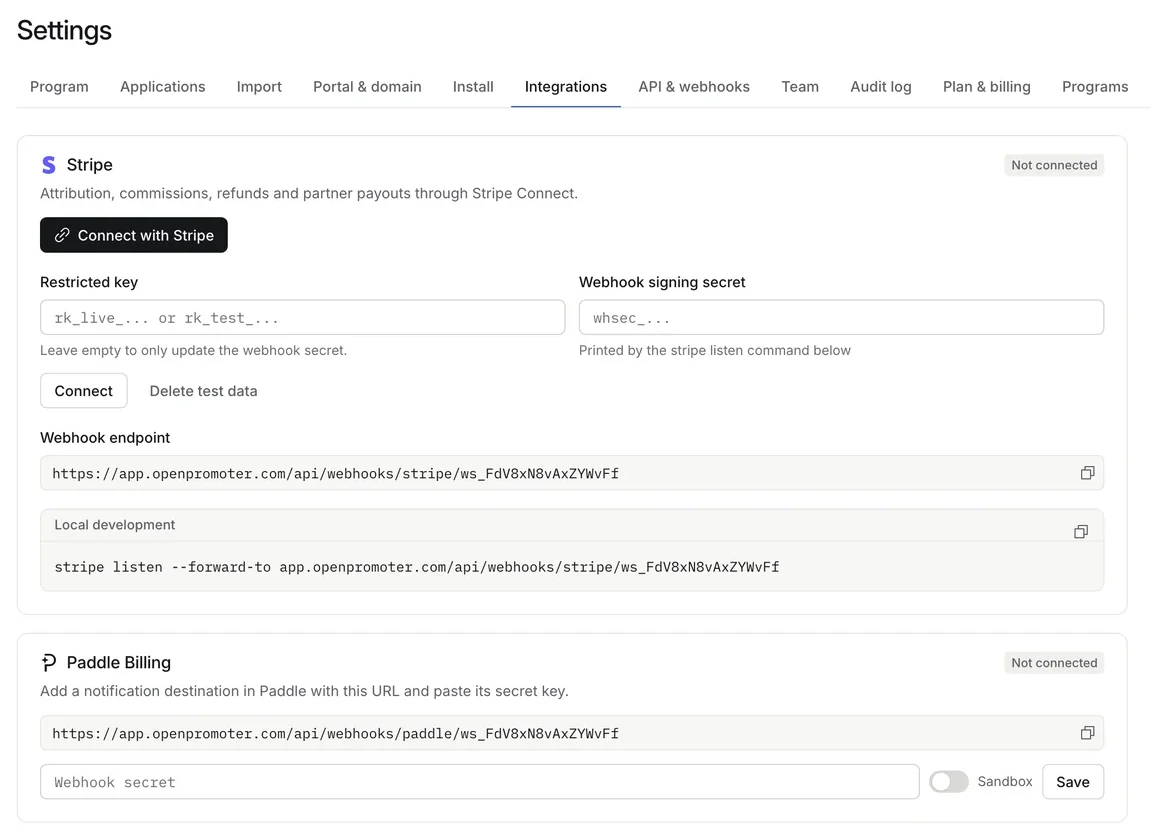
Stripe recommends restricted keys wherever possible. OpenPromoter stores the key encrypted. The Stripe docs page has the full permission table.
Step 2: Set the Commission
Open Settings > Program and find the Commission card. Pick a percent of each payment or a fixed amount. Then set the rate and how long a customer keeps earning for the partner.
The default is 30% recurring for 12 months. You can pay a lower rate for life after that, such as 10%. On a $49 plan, 30% is $14.70 a month for the partner.
Our guide to affiliate commission rates shows what 20 SaaS programs pay.
Step 3: Add the Tracking Script
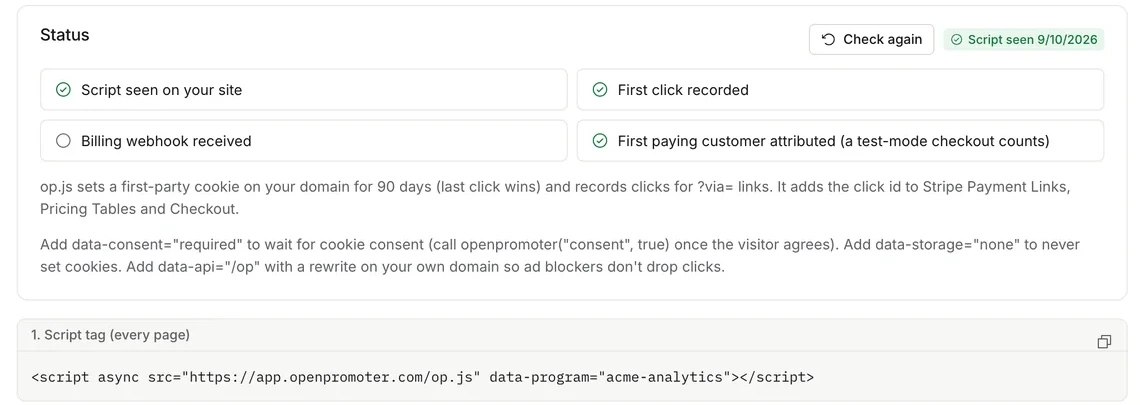
Copy the script tag from Settings > Install into the <head> of your marketing site and your app. It records each partner click and passes the click id to checkout. Stripe Payment Links and Pricing Tables need nothing more.
If your server creates Stripe Checkout Sessions, add the third snippet from the same page. Then click Check again under Status. Four checks turn green as the script, the first click, the webhook and the first attributed customer arrive.
Step 4: Invite Partners
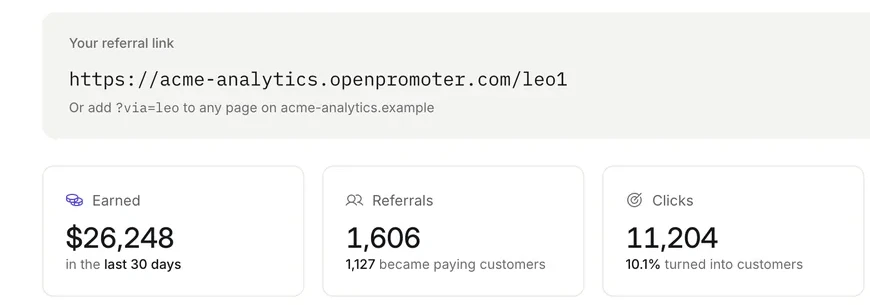
Every approved partner gets a portal with their links, clicks, customers and earnings. They can also share a coupon code that credits them with no click. You can invite partners by email, let people apply on your program page or start with your happiest customers.
The partner copies a link such as ?via=maya. OpenPromoter also reads ?ref=, ?fpr= and ?gspk=, so partners moving from other tools keep their links.
Step 5: Test With a Stripe Test Purchase
Open a partner link and buy through a Stripe Payment Link in test mode. The referral and commission appear in your dashboard marked Test. Test commissions never count toward a payout.
When you are ready, click Delete test data in Settings > Integrations. For a local instance, forward events with the Stripe CLI using stripe listen --forward-to and paste the whsec_ secret it prints.
Step 6: Approve the First Payout
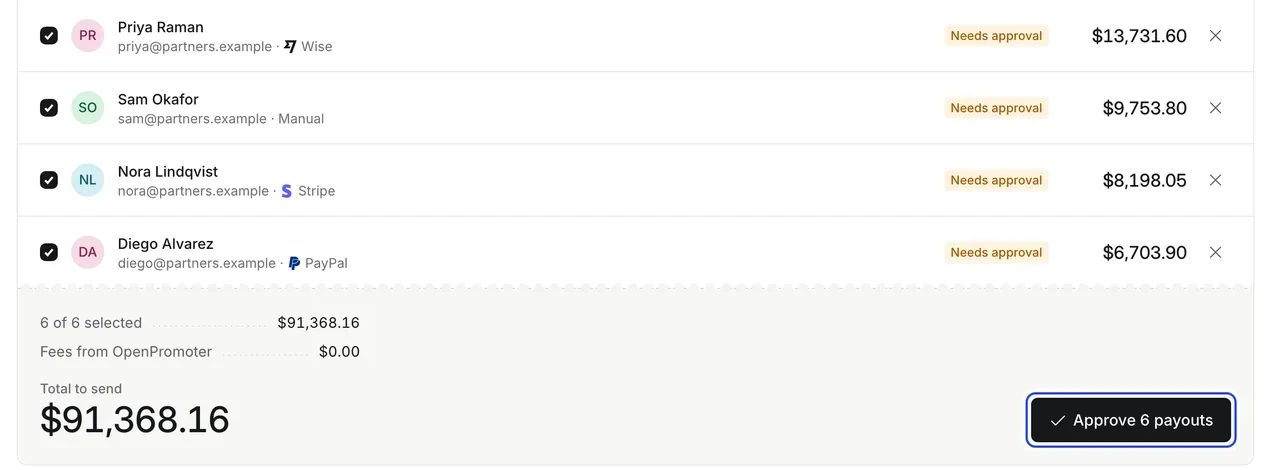
Commissions stay pending through a refund hold of 30 days by default. After that they join a payout batch. You review the batch, see the total and approve it.
OpenPromoter then sends the money through Stripe Connect, PayPal or Wise. The approval screen shows a fee line from OpenPromoter of $0.00.
How Stripe Affiliate Tracking Works
Stripe affiliate tracking credits each sale to the partner with the strongest signal. OpenPromoter checks five signals, strongest first. They are the coupon code, the checkout click id, the metadata partner code, the cookie window clicks and the lead email.
The click id travels in Stripe's client_reference_id or in checkout metadata. That is why a renewal months later still pays the right partner, even if the visitor's cookies are gone.
A coupon wins because it is the customer's own choice. After that, the most specific signal wins. The tracking docs explain consent mode and cookieless mode for sites that need them.
Which Stripe Events Matter for Affiliate Commissions?
Eleven Stripe events drive the program, and four of them matter most to partner earnings. The event invoice.paid books a commission, and charge.refunded reduces it. The event charge.dispute.created holds a commission until the dispute closes, and customer.subscription.deleted stops recurring ones.
| Event | What OpenPromoter does |
|---|---|
invoice.paid |
Books the commission for the first payment and every renewal |
checkout.session.completed |
Reads client_reference_id and promotion codes |
charge.refunded |
Reduces or reverses the commission |
charge.dispute.created |
Holds the commission |
charge.dispute.closed |
Releases it if you won and reverses it if you lost |
customer.subscription.updated |
Updates MRR on upgrades and downgrades |
Stripe does not deliver events in order. OpenPromoter keeps a paid invoice for two days until its partner is known. Every event is checked against the Stripe-Signature header and processed once.
How to Pay Partners From a Stripe Affiliate Program
You pay partners from your own Stripe balance with Stripe Connect. The partner picks Stripe in their portal and finishes Stripe's hosted onboarding. When you approve a payout, OpenPromoter creates a transfer to their account, and a retry never pays twice.
Stripe can pay partners in your own country and across borders between the US, Canada, the UK, the EEA and Switzerland. Partners elsewhere choose PayPal, Wise or a manual payout. Our guide to paying affiliates compares the methods and the tax forms to collect.
What Does a Stripe Affiliate Program Cost?
The software cost depends on the tool you pick. OpenPromoter's Cloud plan is free until partners bring in $1,000 a month in revenue. Paid tiers run $29 to $199 a month, and it takes 0% of your payouts on every plan.
Stripe charges its own Connect fees, and OpenPromoter adds nothing on top. You can also self-host OpenPromoter for free under the AGPL-3.0 license. See the pricing page for the tiers.
Conclusion
A Stripe affiliate program turns your paid invoices into partner commissions. Connect Stripe, set a rate, add the tracking script and invite partners. Then test in Stripe test mode and approve the first payout yourself.
Attribution rides on the click id in Stripe, so renewals keep paying the right partner. Refunds and disputes adjust commissions on their own.
Open the live demo to see the dashboard and partner portal with sample data. Then connect Stripe from the Stripe integration page.
Frequently asked questions
Does Stripe have an affiliate program for my product?
Stripe does not run one for your product. An affiliate tool adds partner links and commissions by reading Stripe's payment events. Stripe also publishes separate terms for promoting Stripe itself.
How do I track affiliates in Stripe?
Add a tracking script that records each partner click and passes the click id to checkout in client_reference_id or metadata. Your affiliate tool then reads Stripe's webhooks and credits the sale. Coupon codes work with no click.
Can I pay affiliates through Stripe?
Yes, with Stripe Connect. Your Stripe account acts as the platform, partners complete Express onboarding and each approved payout is a transfer from your balance. PayPal and Wise are options for countries Stripe does not cover.
What Stripe permissions does an affiliate tool need?
Read access to Customers, Subscriptions, Invoices, Charges, Disputes, Checkout Sessions, Products and Prices. It also needs write access to Promotion codes, Coupons and Webhook Endpoints. Add Accounts, Account Links and Transfers write access to pay partners through Connect.
Do renewals keep paying the partner?
Yes. Commissions are booked on invoice.paid, which fires for the first payment and every renewal. You choose how many months a customer earns for the partner, or pay for the life of the customer.
Can I run a Stripe affiliate program for free?
The OpenPromoter Cloud plan is free until partners bring in $1,000 a month, and self-hosting is free with no limits. Stripe's own processing and Connect fees still apply. For more on setup, see our guide to open source affiliate software.