
The answer to how to pay affiliates is to send one approved batch a month for commissions past your refund window. Book each commission on a paid invoice, hold it through refunds and apply a minimum balance. Then a person approves the batch and each partner is paid on the rail they chose.
This guide comes from the OpenPromoter payout code and docs plus the Stripe, PayPal, Wise and IRS pages, all checked in November 2026. One thing to know first: we make OpenPromoter. The steps and the rail comparison apply to any tool, and our own product gets one section near the end.
You get the six steps in order and a fee table for Stripe Connect, PayPal Payouts, Wise and bank transfers. One month's batch is then worked through with round numbers. After that come schedules, the tax forms to collect first and paying partners abroad.
How to Pay Affiliates in Six Steps
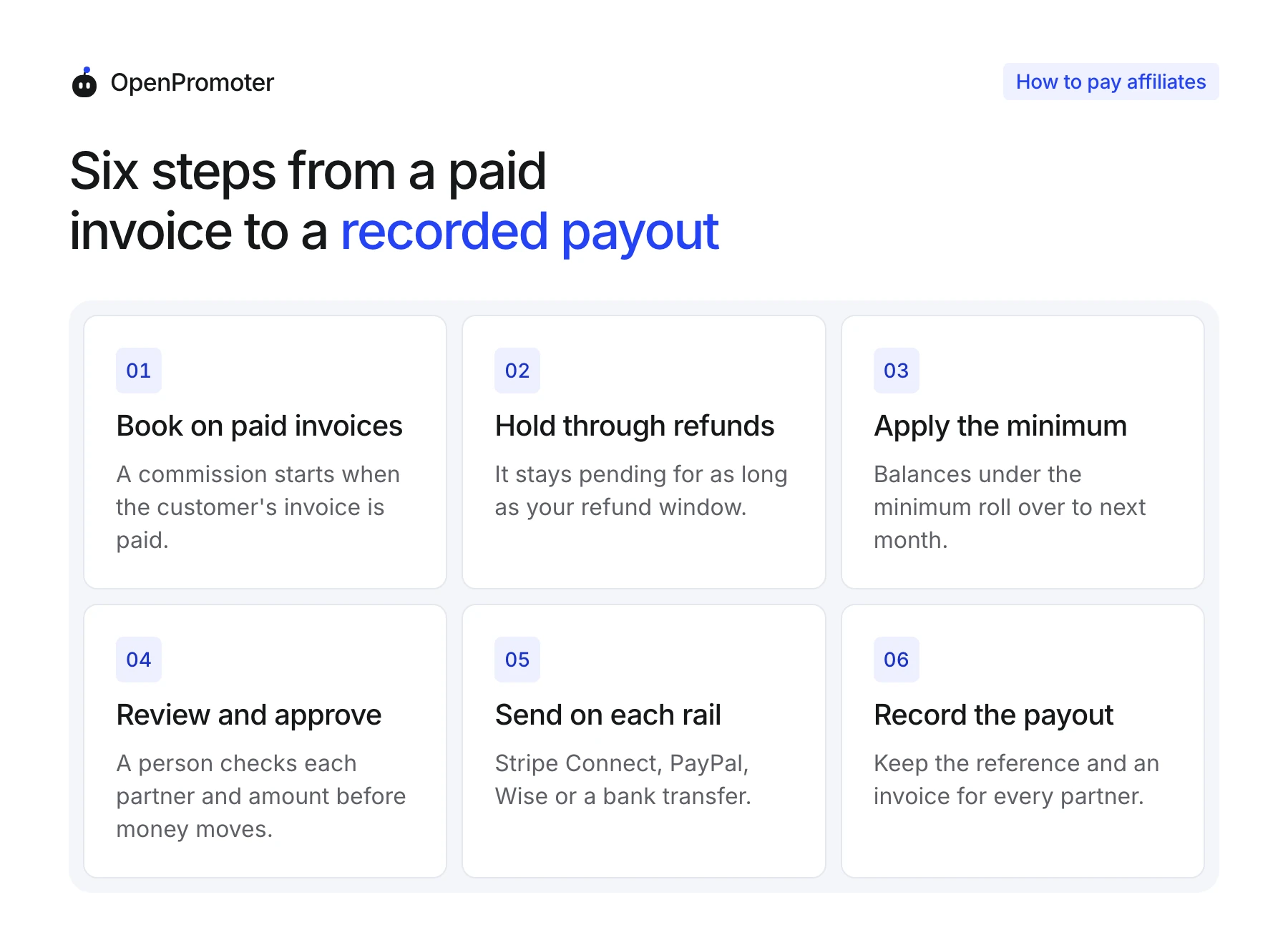
Learning how to pay affiliates comes down to six steps that always run in the same order. You book each commission on a paid invoice, hold it through refunds, apply a minimum and approve the batch. Then you send each payout on the partner's rail and record it with a reference and an invoice.
Each step protects the one after it. Skip the hold and you pay commissions on sales that get refunded a week later. Skip the review and a wrong rate or a flagged partner gets paid before anyone looks.
Run the steps in this order for every batch, the first one included:
- Book on paid invoices: A commission starts when your billing system reports a paid invoice. A click, a trial or a signup earns nothing until the customer pays.
- Hold through the refund window: Keep each commission pending for at least as long as your refund policy. A full refund inside the hold cancels it, and a partial refund lowers it.
- Apply a minimum balance: Partners owed less than the minimum roll over to the next run. Tiny transfers stop costing more in fees than they are worth.
- Review and approve the batch: A person on your team reads each partner, rail and amount before money moves. Flags from preventing affiliate fraud belong in this review.
- Send on each partner's rail: Pay each partner through the method they picked in your portal or onboarding. Offering two or three rails gives partners in other countries a working option.
- Record the payout: Save the provider's reference, the date and a commission invoice for each partner. Your year-end tax totals come straight from these records.
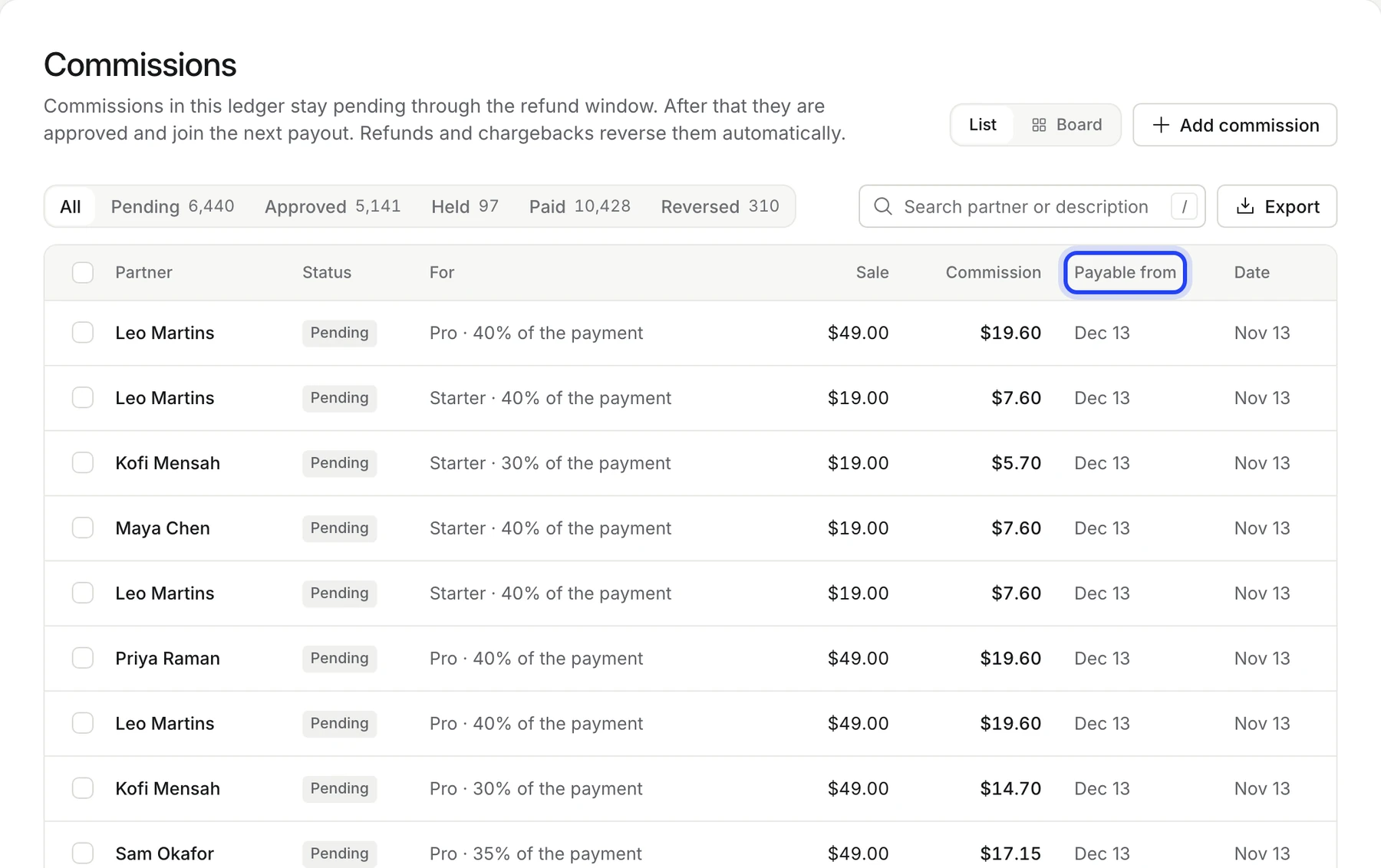
Your ledger should show when each commission becomes payable. In OpenPromoter every pending line carries a Payable from date, which is the booking date plus the refund hold.
Refunds that land after a payout still need a rule. The usual one is a clawback: the refunded commission comes off the partner's next payout as a negative line. Write it into your terms before the first batch so nobody is surprised by it.
Open chargebacks follow the same logic. Hold the commission while the dispute is open, release it if you win and reverse it if you lose.
Affiliate Payment Methods Compared
The four common affiliate payment methods are Stripe Connect, PayPal Payouts, Wise and a plain bank transfer. On all four you pay the sending fee, and the amount depends on the rail and the partner's country. Pick the rail your partner can receive on with the lowest fee for that route.
Here is how the four rails for affiliate payments compare on the points that decide a first batch. Fees are as of November 2026 and come from each provider's own pages:
| Rail | Fee you pay | Where it works | What the partner sets up |
|---|---|---|---|
| Stripe Connect | $2 per active account a month plus 0.25% + 25¢ per payout | Both sides in the US, UK, EEA, Canada or Switzerland | Stripe's own onboarding with identity and bank details |
| PayPal Payouts | 2% capped at $1 in the US, or $0.25 each through the API | Many countries but not all | A verified PayPal account that can hold a balance |
| Wise | Free in the same currency to another Wise account | Partners with a Wise account or a local bank | A Wise account email |
| Bank transfer | Whatever your bank charges for ACH or a wire | Anywhere your bank can send | Bank details and an invoice |
Stripe's help center lists Connect fees of $2 per monthly active account and 0.25% + 25¢ when your platform handles pricing. That page ties the figures to platforms that went live before April 2024. Check the pricing shown in your own Stripe account before you budget.
The strength of Stripe Connect is its onboarding. Stripe checks the partner's identity and collects their tax details during Stripe Connect onboarding. Your Stripe account is the platform here, and the fees come out of your Stripe balance.
PayPal's own guide lists a 2% fee capped at $1 for US payouts sent from the website. Through the Payouts API the fee is a flat $0.25 per payment. PayPal says the sender pays and recipients pay nothing to receive.
International PayPal payouts cost 2% with a cap that depends on the recipient's country. Each partner needs a verified PayPal account that can hold a balance.
Our PayPal Payouts guide covers the limits and the setup. That last point trips up partners in countries where PayPal limits accounts.
Wise says it is free to send the same currency from a Wise Business account to another Wise account. When the currencies differ, Wise converts at the mid-market rate and adds a small conversion fee. It fits partners abroad who already hold a Wise balance.
A bank transfer costs whatever your bank charges for ACH or an international wire. It works almost anywhere, but each payment is sent by hand and matched to an invoice afterward.
A Worked Example: One Month's Payout Batch
Here is one month's payout batch for five partners worked through with round numbers. The program pays monthly on the 1st, holds each commission for 30 days and sets a $50 minimum. On December 1, 2026, four partners are paid, one rolls over and the known rail fees come to $5.50.
Each partner below shows what was approved, what changed it and what the rail costs you:
- Ana in the US on Stripe Connect: She has $1,300 approved, but $100 sits on hold for an open chargeback. She gets $1,200, and the fee is $3.25 per payout plus the $2 active account fee.
- Ben in the US on PayPal: He earned $300, and one of his customers was refunded after his last payout. The $60 clawback leaves $240. The API sends it for $0.25.
- Chloe in France on Wise: Her $400 goes in US dollars to her Wise account at no fee. She converts it to euros whenever she likes.
- Dev in India by bank transfer: India sits outside Stripe's self-serve cross-border regions. You send a $500 wire and mark the payout paid with the bank's reference.
- Eva in the US on PayPal: She has $40 approved, which is under the $50 minimum. Her balance rolls over to January and nothing is sent.
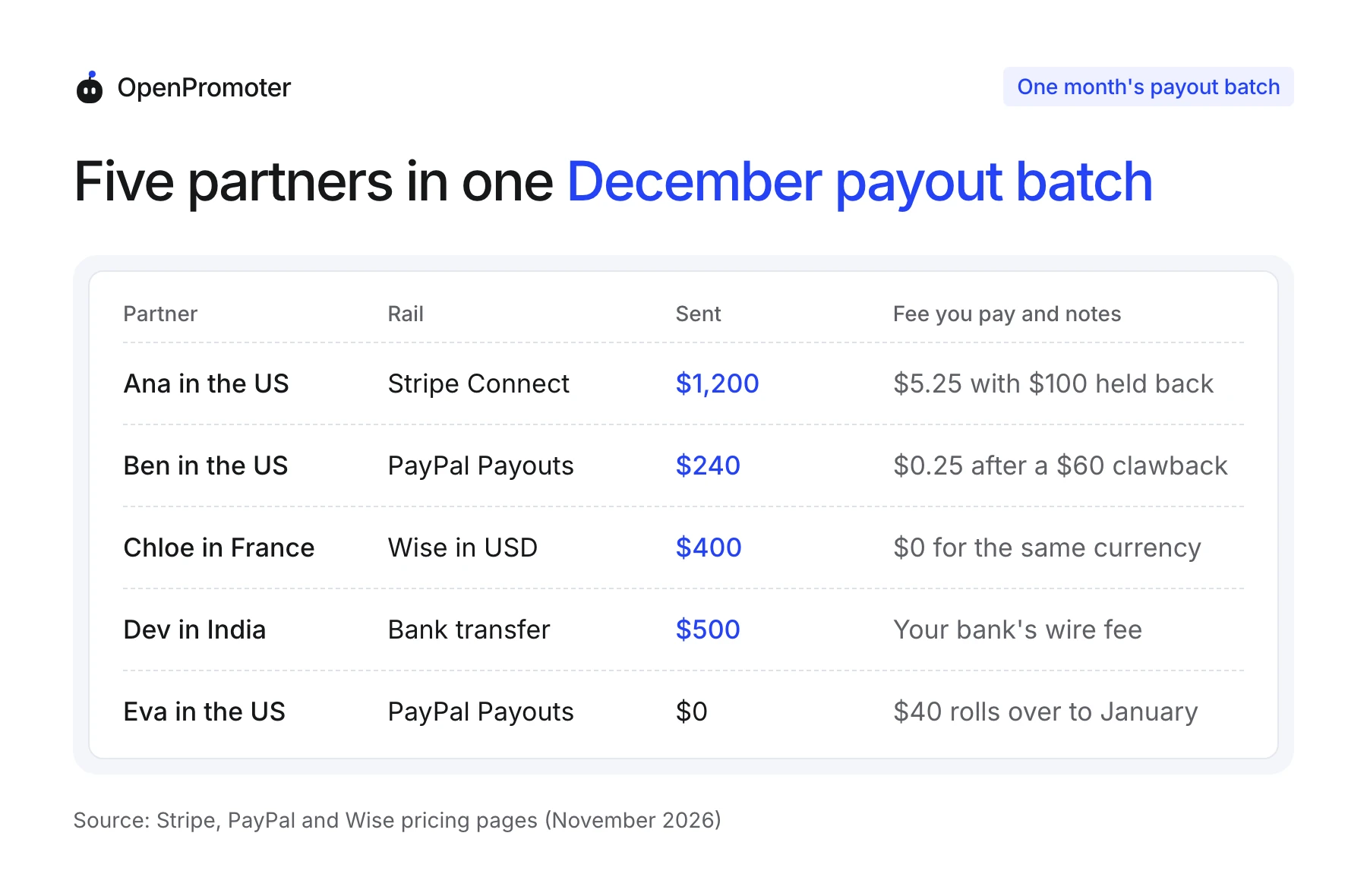
The batch sends $2,340 to four partners. The known fees are $5.25 for Stripe and $0.25 for PayPal, plus whatever your bank charges for the wire.
The Stripe figure is 0.25% of $1,200, which is $3.00, plus the 25¢ per payout and the $2 account fee. Ana's held $100 waits for the chargeback to close and joins a later batch if you win.
Note: These fees come from the provider pages in November 2026. Caps and cross-border rates change by country. Check each page for your own route before you budget.
How Often to Pay Affiliates and What Minimum to Set
A monthly payout after the refund hold is the easiest schedule to run and reconcile with your books. Set the hold to at least your refund window and the minimum near $50. Weekly payouts feel generous to partners but multiply your fees, approvals and bookkeeping.
The three common schedules each suit a different stage of a program:
- Monthly on the 1st: One batch, one approval and one set of records a month. It suits almost every new program.
- Weekly: Partners see money sooner, but you approve four or five batches a month. Consider it once a few large partners ask for it.
- On request: Partners ask for a payout once they pass the minimum. You still approve each one. That adds work as the program grows.
The hold comes first, and the schedule sits on top of it. A 30 day refund promise needs a hold of at least 30 days. A sale on November 13 then becomes payable on December 13 and goes out with the January 1 batch.
The minimum is about fees.
On a $10 payout, the $0.25 PayPal API fee is 2.5% of what you send. On a $200 payout it is about 0.13%. That gap is why small balances wait for the minimum.
In OpenPromoter the three settings sit under Settings > Program > Payouts as Refund hold, Minimum payout and Schedule. Schedule offers Monthly (1st), Weekly (Monday) or Only when I click. A scheduled run prepares the payouts, and they still wait for your approval.
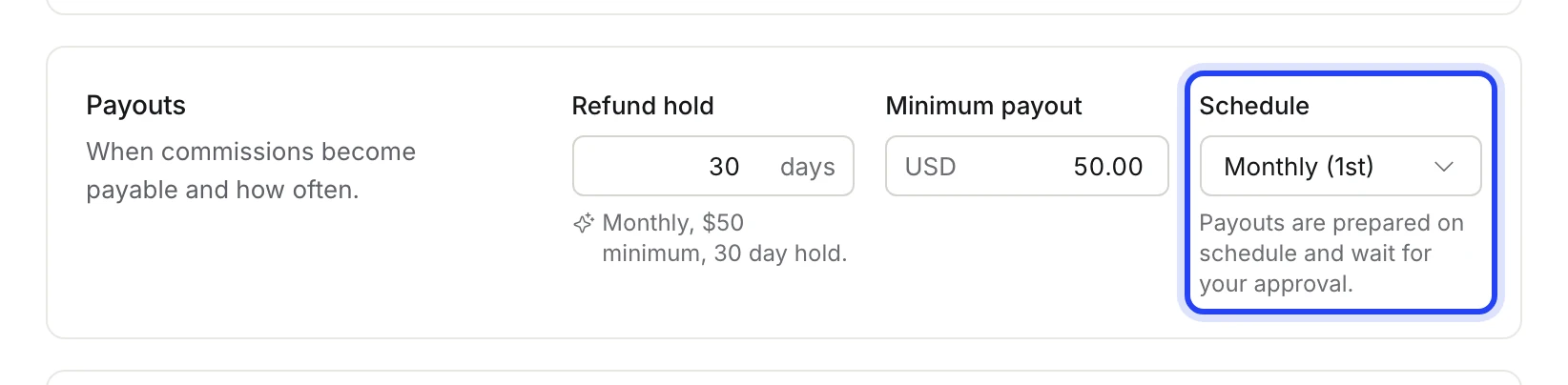
Publish the schedule, the hold and the minimum where partners see them before they join. A partner who knows the January 1 date will not email you on December 20.
Tax Forms to Collect Before You Pay Affiliates
Collect a Form W-9 from every US affiliate and a Form W-8BEN or W-8BEN-E from partners abroad before the first payout. US partners you pay $2,000 or more during 2026 need a Form 1099-NEC from you. A partner who has already been paid has little reason to answer a request for forms.
The IRS describes the Form W-9 as the way a payee gives you their correct taxpayer identification number. You need that number to file the 1099-NEC. The current form is the March 2024 revision.
Partners outside the US use the W-8 forms. The IRS tells foreign individuals to give Form W-8BEN to the payer, and in your program that payer is you. Foreign companies use the W-8BEN-E.
The reporting line moved for 2026 payments. The IRS 1099-NEC instructions say the threshold increased to $2,000 for tax years beginning after 2025. Payments made in 2025 still used the old $600 line.
One rule keeps you out of trouble at payout time. Hold any payout that would take a US partner past the threshold for the year. Release it once a W-9 with an SSN or EIN is on file.
Stripe Connect collects tax details during its own onboarding. Partners paid by PayPal, Wise or bank transfer fill in the form in your portal or by email.
The 1099-NEC threshold for 2026 guide covers who gets a form, LLC partners and the February 1, 2027 deadline. This is general information and not tax advice. Check your own case with a tax advisor.
Paying Partners in Other Countries and Currencies
Pay partners abroad in your program's currency through Wise or PayPal, or through Stripe Connect when both sides sit in a supported region. Let each partner convert to their own currency when the money arrives. Your batch then stays in one currency and your books stay simple.
Stripe Connect has the tightest map. Stripe's docs say platforms in the US, UK, EEA, Canada or Switzerland can transfer funds to connected accounts in any of those regions. For other countries Stripe points to its separate Global Payouts product or a sales conversation.
PayPal reaches more countries, with a 2% international fee capped by the recipient's country. PayPal's developer docs add that currency conversion carries extra fees. Sending in the currency the partner's account already holds avoids that charge.
Wise converts at the mid-market rate when a conversion is needed. A partner with a Wise balance in your currency receives the money with no fee and converts later on their own terms.
Some founders cannot use a rail at all from their own country. The OpenPromoter payouts docs note that PayPal does not let accounts in some countries send Payouts, India among them.
Stripe also limits Connect payouts from accounts in some of those countries. Founders there pay partners with Wise or a bank transfer.
Customers may also pay you in several currencies. Keep a separate balance per currency, and pay each one in the currency it was earned in.
EU business partners can give you a VAT ID for their commission invoice. That lets the invoice carry the reverse-charge note in place of a VAT charge.
Paying Affiliates by Hand or Automatically
Paying affiliates by hand works while the list is short: export the balances, send each transfer and mark it paid. Once a batch takes more than an hour, automatic payouts through PayPal, Wise or Stripe Connect earn their place. Either way, a person on your team should approve before money moves.
A manual batch is a spreadsheet and a banking session. Export who is owed what, send each payment from your bank or PayPal account and paste the reference back next to each partner.
Automatic payouts send the whole batch from one approval. Wise Business says one batch transfer can carry up to 1,000 payments.
Every payment should carry a unique key so a retry never pays the same partner twice. Ask any payout tool how it handles a timeout halfway through a batch.
Some payouts will fail. A wrong PayPal email, a closed account or a missing tax form stops the money. The commissions should then go back into the partner's balance for the next run.
PayPal payouts that nobody claims come back too.
PayPal's Payouts fee docs say unclaimed payouts are returned after 30 days. Remind any partner who has not claimed theirs. Wise profiles in the UK and EEA must approve funding for each transfer inside the Wise app.
How OpenPromoter Handles Affiliate Payouts
OpenPromoter prepares affiliate payouts on your schedule and sends nothing until an owner, admin or finance member approves them. Partners are paid through Stripe Connect, PayPal, Wise or bank transfer. OpenPromoter takes 0% of payouts on every plan, and you pay only each provider's own fee.
The Payouts page shows what is ready to pay, what waits for approval and the approval queue. Each row names the partner, the rail and the amount, and you can untick a partner to leave them for later.
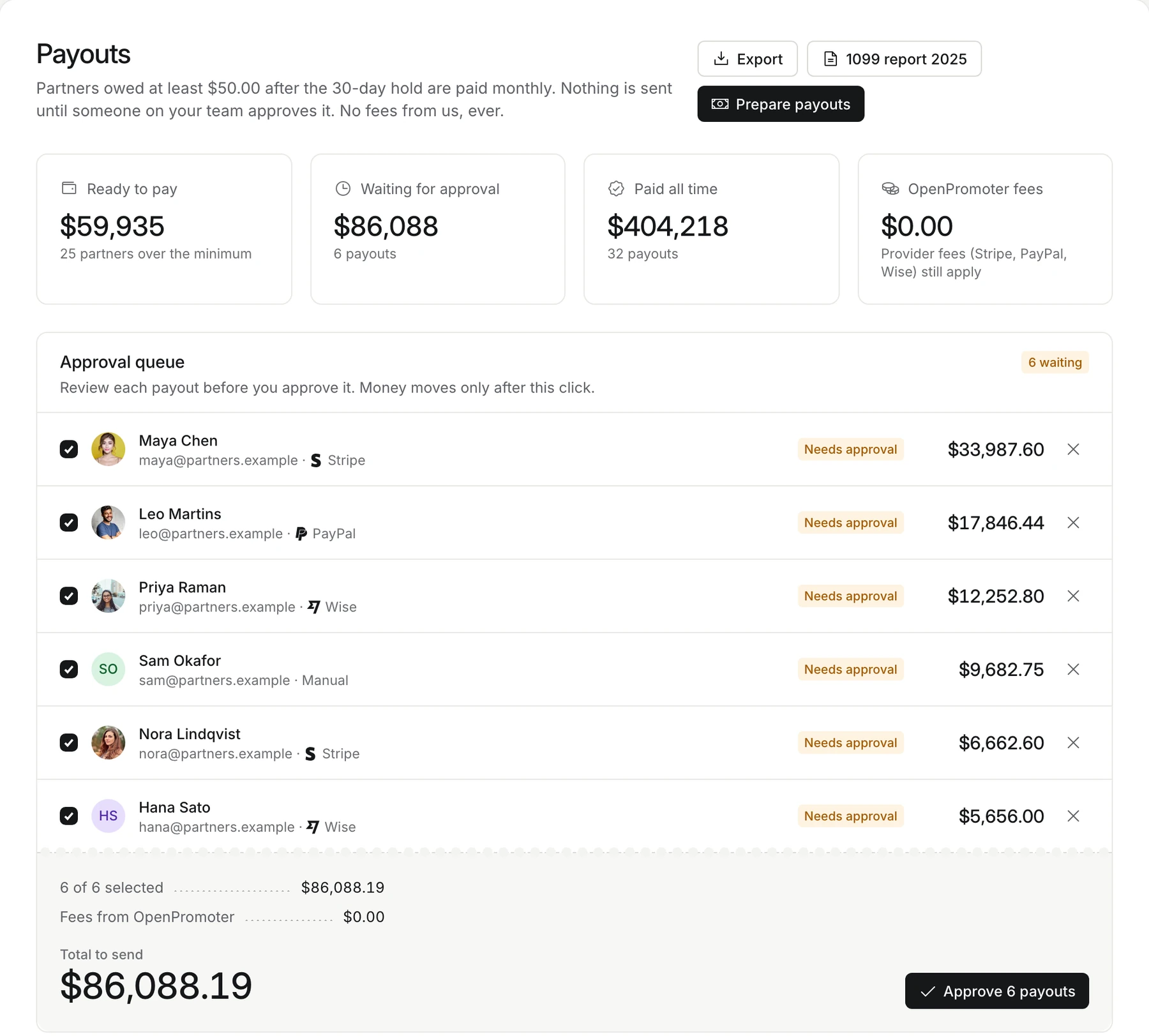
Approving more than 1,000 in your program's currency at once needs a fresh two-factor code. API keys, the MCP server, Autopilot and every AI feature can prepare payouts but can never approve them.
A payout sent through PayPal or Wise shows Processing until the money lands. OpenPromoter checks its status every 10 minutes. A refused payout moves to Failed with the reason, and its commissions join the next run.
Every payout gets a sequential number such as OP-00029 and a self-billed commission invoice. Partners find the same invoice in their portal. A US partner paid outside Stripe needs a W-9 on file before a payout takes them past the 1099-NEC threshold.
If you want a vendor to hold the money and file 1099s for you, a managed payout service does that. To keep payouts in your own Stripe, PayPal and Wise accounts, see affiliate payouts with a 0% fee.
Conclusion
The core of how to pay affiliates is order. Book commissions on paid invoices, hold them through your refund window and roll small balances over. Then have a person approve one batch a month.
Pick rails by where your partners live. Stripe Connect suits partners when you both sit in the US, UK, EEA, Canada or Switzerland. PayPal and Wise cover most of the rest, and a bank wire handles the few that remain.
Collect a W-9 or W-8BEN before the first payout instead of chasing it in January. If you are still setting up, the guide to starting a SaaS affiliate program covers the rate, the cookie window and the terms.
Frequently asked questions
How do affiliates get paid?
Affiliates get paid from the commission balance that has cleared the program's refund hold. Once the balance passes the minimum, the program sends it on its schedule through PayPal, Wise, Stripe Connect or a bank transfer.
How long after a sale do affiliates get paid?
It takes the refund hold plus the wait for the next payout run. Say you hold for 30 days and pay monthly on the 1st. A sale on November 13 becomes payable on December 13 and goes out on January 1.
Who pays the fee on an affiliate payout?
The program that sends the money pays the sending fee on all four rails in this guide. PayPal says recipients pay nothing to receive a payout. A partner may still pay their own bank or a conversion fee later.
How much should you pay affiliates?
The rate depends on your margins and how long customers stay. The guide to affiliate commission rates compares what real SaaS programs pay and shows how to pick a rate from your own numbers.
What happens if an affiliate payout fails?
The money stays with you and the commissions go back into the partner's balance. Fix the cause, such as a wrong PayPal email, and the amount joins the next run. PayPal returns unclaimed payouts after 30 days, according to its Payouts fee docs.
Can you pay affiliates in account credit instead of cash?
You can if your terms say so and the partner agrees. Credit suits customers who refer friends, which the guide to a SaaS referral program covers. A partner who promotes you as a business will usually want cash.
Do you need an affiliate agreement before the first payout?
Yes. The agreement sets the rate, the hold, the minimum, the schedule and the clawback rule that every payout follows. Start from an affiliate agreement template and have partners accept it when they join.