
PayPal Payouts is PayPal's way to send commissions to many partners at once from a business account. Partners receive the money by email or phone number, and you pay the fee. It reaches affiliates in most countries, with a few limits you should know before you start.
This guide comes from PayPal's developer docs and fee pages plus the OpenPromoter payout code, all checked in November 2026. One thing to know first: we make OpenPromoter, and our own product gets one section near the end. The fees, limits and setup steps apply to any affiliate tool.
You get the fees worked through with round numbers, the limits that matter and the setup steps in order. After that come the API against bulk upload, the failures that hold a payout up and the cases where another rail fits better.
What Is PayPal Payouts?
PayPal Payouts lets a business send money to many recipients in one batch, either through an API or by uploading a file. Recipients are identified by email, phone number or PayPal ID. PayPal charges the sender, and recipients pay nothing to receive the money.
PayPal's developer docs call the product Payouts. Older guides and vendors still call it PayPal Mass Pay. PayPal's guide for businesses describes the same job as mass payments, also known as mass payouts.
For an affiliate program this means one approved batch a month instead of one manual transfer per partner. Each partner only needs to give you an email address. If a partner has no PayPal account yet, they can create one to claim the money.
PayPal Payouts Fees: What You Pay per Affiliate
You pay the fee, and the affiliate pays nothing to receive. PayPal's guide lists a flat $0.25 per payment through the API for US payouts and 2% capped at $1 when you send from the website. International payouts cost 2% with a cap that depends on the recipient's country.
Here is how the routes compare, as PayPal states them in its guide to Payouts:
| Route | Fee you pay |
|---|---|
| US to US through the API | $0.25 per payment |
| US to US from the website | 2% capped at $1 per payment |
| International | 2% capped by the recipient's country |
| Currency conversion | An extra fee on top |
The fee comes out of the same PayPal account that funds the batch. PayPal's fees page says that account must hold enough to cover both the payout total and the fees.
Say you pay 40 US partners $150 each in one run. Through the API the fees are 40 × $0.25, which is $10. The account then needs $6,010.
From the website the 2% fee is $3 per payment, but the $1 cap applies. The fees come to $40.
The flat API fee is not always the cheaper one. On a $10 payment, 2% from the website is $0.20 against $0.25 through the API. At $12.50 the two fees are equal, and above that the API wins.
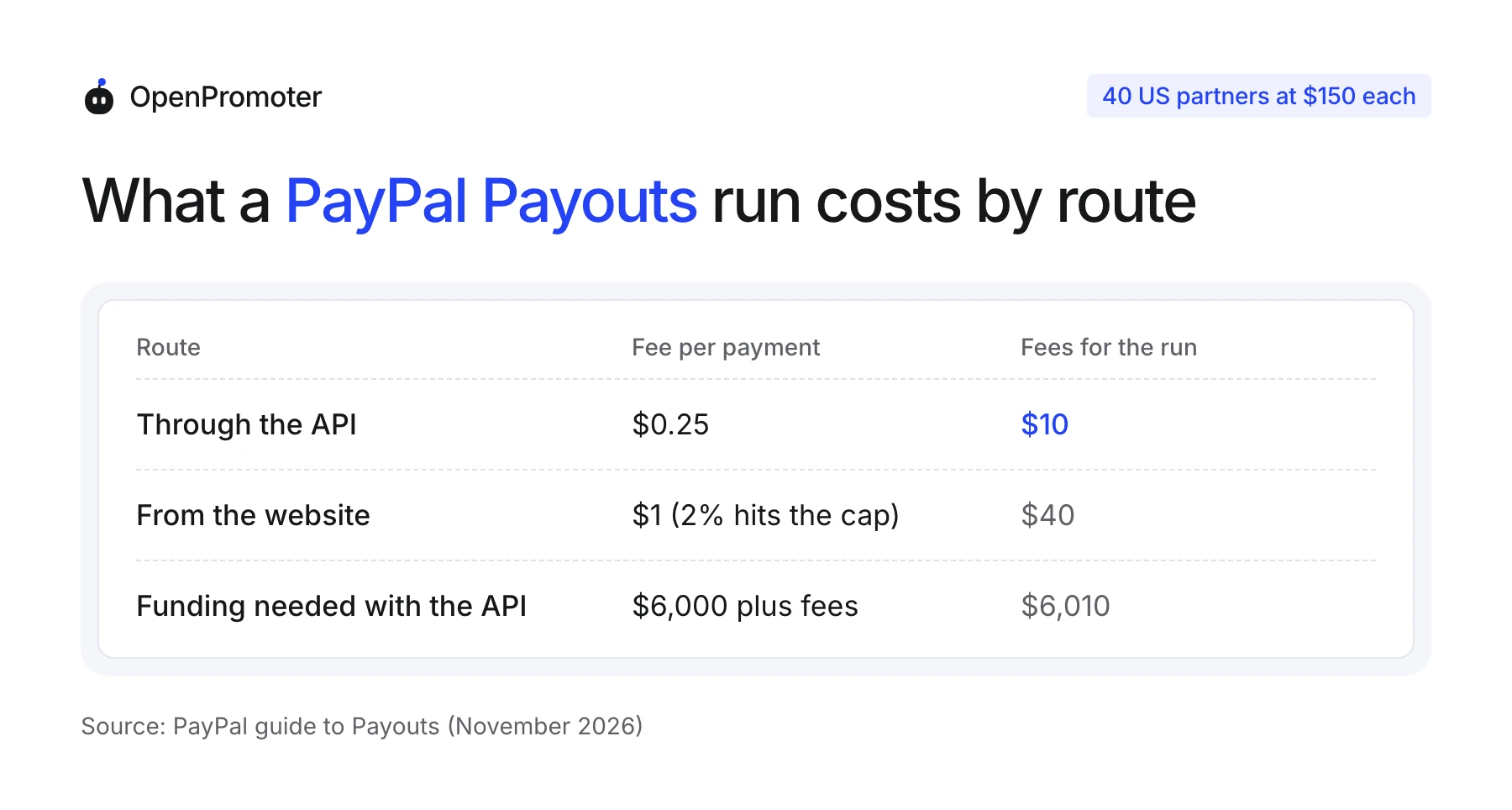
Note: PayPal's guide dates these figures to January 2023 in a footnote. PayPal's fees page, updated October 14, 2026, says the fee is usually 2% and varies by country. Check the fee schedule on your own account before you budget.
Currency conversion deserves its own check. PayPal says a payout that needs conversion carries extra fees. Fund the batch in the currency the partner's account holds and you avoid that charge.
PayPal Payout Limits and What They Mean for Batches
PayPal's FAQ says each payment can be no more than $20,000 by default and sets no limit on the total payout. A batch holds up to 15,000 items, and the API accepts 400 POST requests a minute. Ask your account representative if you need a higher per-payment limit.
PayPal's Payouts FAQ states the default limit and the route to raise it. The fees page lists higher maximums per currency, and they depend on whether the recipient already has an account. For US dollars the page shows 60,000 for a registered recipient and 20,000 for an unregistered one.
The same table gives these maximums for other currencies:
| Currency | Registered recipient | Unregistered recipient |
|---|---|---|
| USD | 60,000 | 20,000 |
| EUR | 55,000 | 17,000 |
| GBP | 50,000 | 15,000 |
| CAD | 80,000 | 25,000 |
Use the lower figure as your planning number. Affiliate commissions rarely come close, but a single large bonus or a year of unpaid balance can.
The funding limit bites sooner. The balance must cover the whole batch before you approve it. A $6,000 run needs $6,000 plus fees sitting in the account.
How to Pay Affiliates With PayPal Payouts
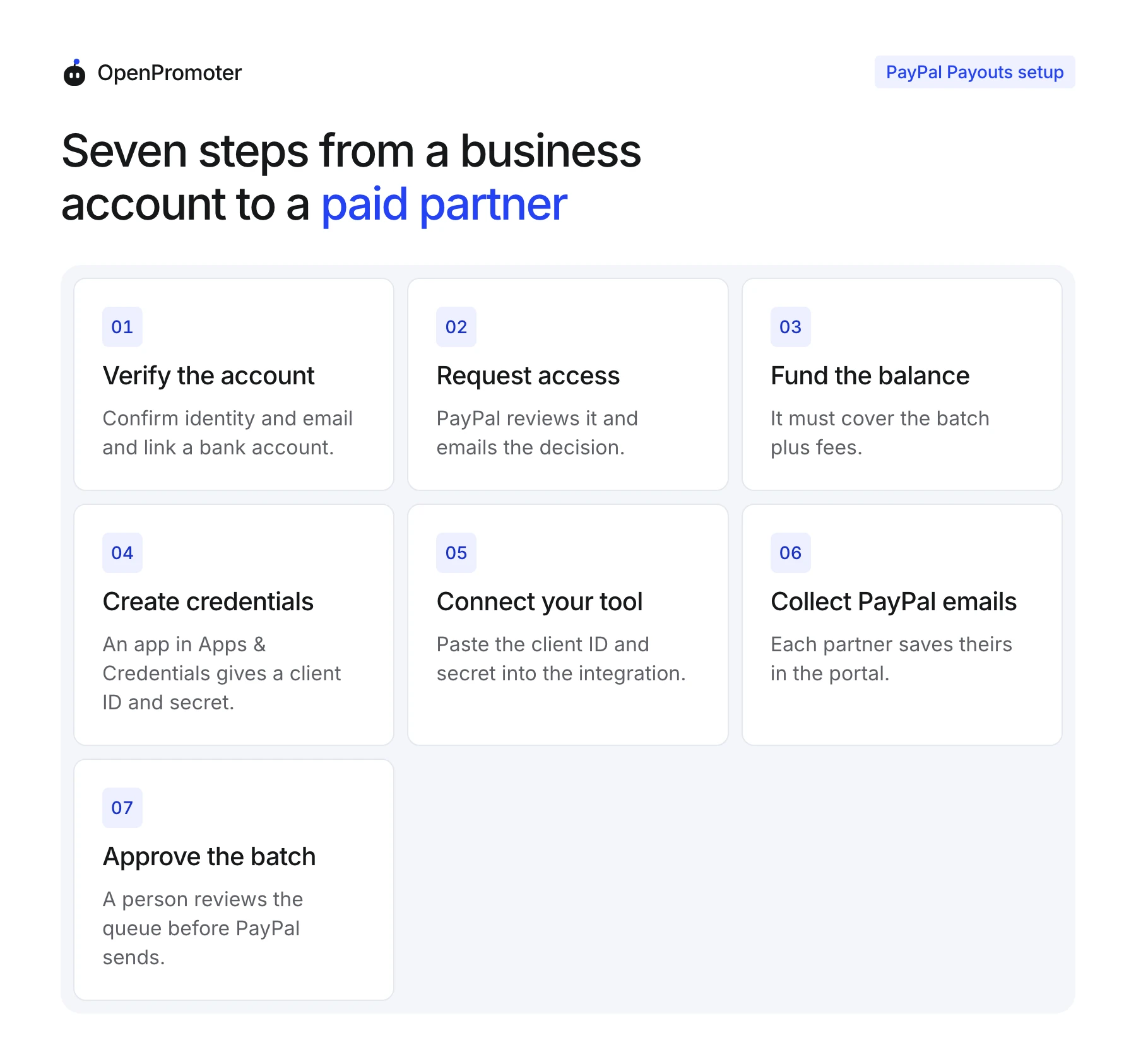
To pay affiliates with PayPal Payouts, request Payouts access on a verified business account and fund the balance. Then create API credentials, connect them to your affiliate tool and collect each partner's PayPal email. Approve the batch, and PayPal sends each payment.
The steps run in this order. Request access first, because PayPal reviews it and you cannot send live payments without it:
- Verify the business account: PayPal's setup page asks you to confirm your identity and email and to link a bank account or card.
- Request Payouts access: PayPal's Payouts overview says you need to request access, and PayPal emails its decision. You can test in sandbox while you wait.
- Fund the balance: Transfer money from the linked bank account or card into your PayPal balance. Auto-funding is optional.
- Create API credentials: In your PayPal developer dashboard open Apps & Credentials and create an app. Use the Sandbox toggle for tests and Live for real payouts. Copy the client ID and secret.
- Connect PayPal to your affiliate tool: In OpenPromoter open
Settings > Integrations, find PayPal Payouts and paste the client ID and secret. Switch Sandbox on for test credentials.
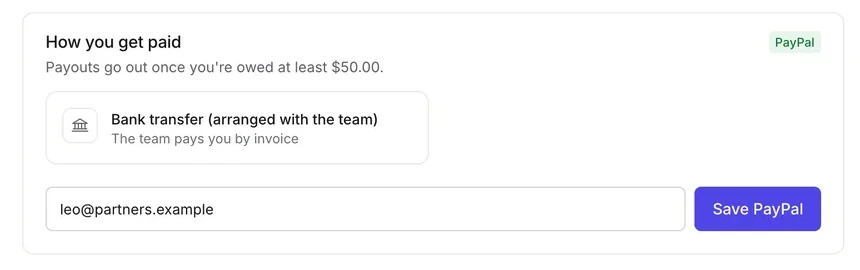
- Collect each partner's PayPal email: Partners save theirs under Payouts in the partner portal. You can also type it on the partner's page.
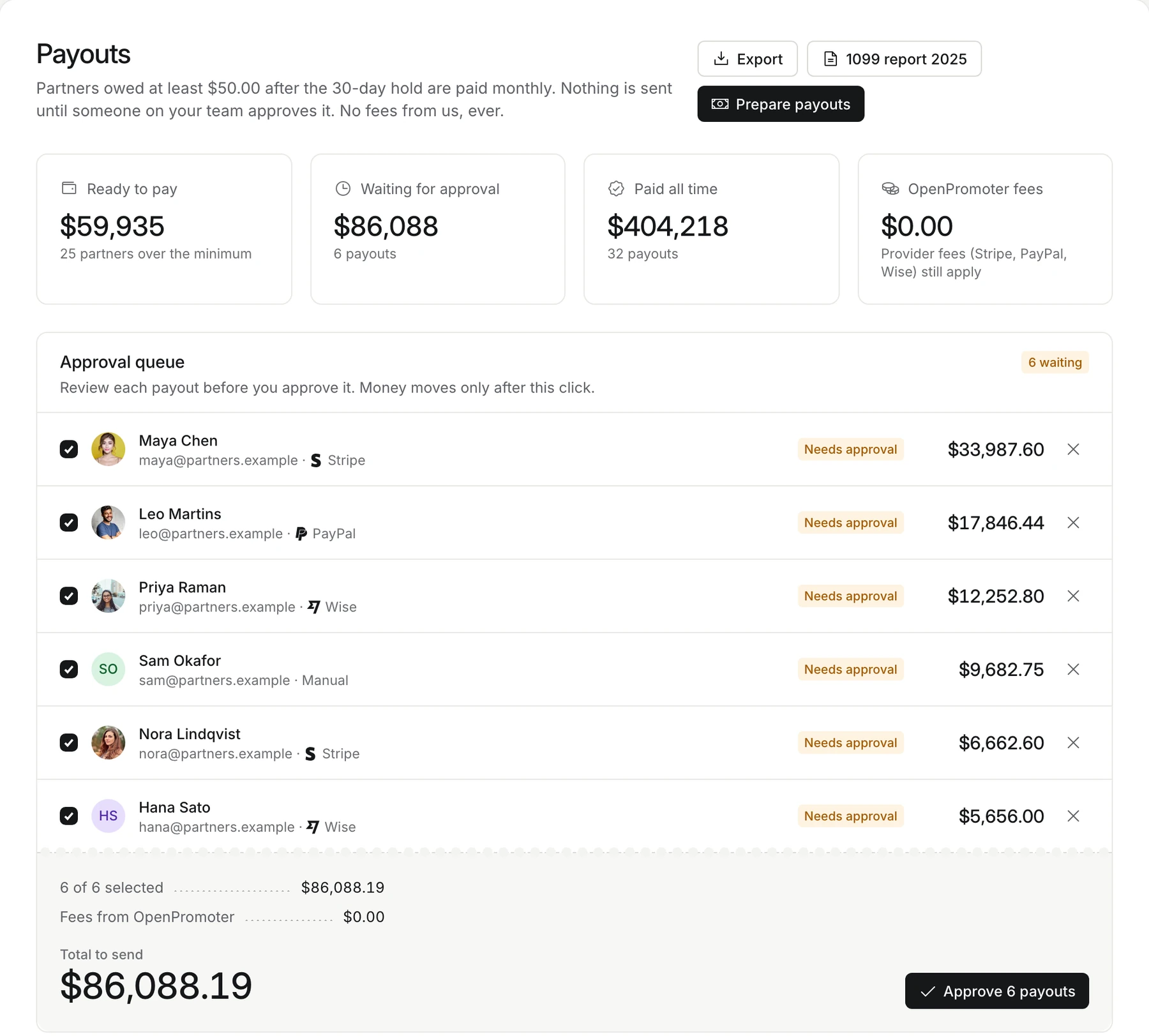
- Approve the batch: Review each partner and amount in the approval queue and approve. The payout shows Processing until PayPal confirms it.
Tip: Test in sandbox first. PayPal's sandbox does not support the PHONE recipient type. Test with email addresses.
PayPal Payouts API or Bulk Upload?
The PayPal Payouts API sends payments from your own software, while the website route uploads a file by hand. The API costs a flat $0.25 per US payment against 2% capped at $1, and it is safe to retry. Choose the website for a short and rare batch.
PayPal's guide puts the website upload at 10,000 payments per batch and the API at 15,000. The upload suits a founder who pays three partners a quarter. Once you pay every month, the API saves the file handling and the extra fees.
Retries are where the API earns its place. A payout request can carry a sender_batch_id of up to 256 characters. PayPal's API reference says it does not process duplicate payouts.
An ID reused within 30 days is rejected with a link to the original payout. After a server error you can retry the same request with the same ID. That is how a tool can resend a timed-out payout without paying the partner twice.
The PayPal payout API signs in with OAuth 2.0 client credentials and the scope https://uri.paypal.com/payments/payouts. You never type that yourself, but it explains why the client ID and secret are all your affiliate tool asks for.
Why a PayPal Payout Fails or Stays Unclaimed
A PayPal payout stalls for a few common and fixable reasons. The partner's email is wrong or unconfirmed, the notice lands in spam or your balance is too low to cover the batch. An unclaimed payment is returned to you after 30 days.
Check the email first. Check the balance and the currency next.
Each cause has a different fix:
- Wrong or unconfirmed email: PayPal's FAQ lists a wrong address and an unconfirmed recipient email as reasons a partner does not receive a payment. Ask the partner to confirm the email on their PayPal account.
- Notice in spam: The partner never sees the claim email. Ask them to search their spam folder for PayPal.
- Unclaimed payment: A partner without an account must create one to claim the money. PayPal says unclaimed payments expire in 30 days and return to the sender.
- Balance too low: The funding account must hold the payout total plus fees. Top up and send again.
- Currency PayPal cannot convert: PayPal's currency page excludes several countries from automatic conversion. China, India and Thailand are among them. Pay those partners in another rail.
- Duplicate batch ID: A reused ID is rejected for 30 days. A good tool uses a new ID for each payout and the same ID for a retry.
Cancel an unclaimed payment yourself if you would rather not wait the 30 days. PayPal's FAQ says only unclaimed payments can be canceled.
When Another Payout Rail Fits Better
Pay by PayPal when most partners already use it and sit in countries PayPal reaches. Use Wise when partners abroad would otherwise pay PayPal's conversion fee on every payout. Use Stripe Connect when you want identity and tax details collected for you.
PayPal does not collect a tax form for you. Ask every US partner for a W-9 before the first payout, and ask partners abroad for a W-8BEN. The 1099-NEC threshold guide covers who needs a form and the 2026 change to $2,000.
The guide to paying affiliates compares PayPal, Wise, Stripe Connect and bank transfers side by side. It also covers schedules and minimums, which matter more than the rail once your program grows.
How OpenPromoter Sends PayPal Payouts
OpenPromoter sends each PayPal payout through the Payouts API after an owner, admin or finance member approves it. The money goes to the partner's PayPal email in your program's currency. OpenPromoter takes 0% of payouts and PayPal's fee is the only cost.
Setup steps, statuses and failure messages are in the payouts docs. The affiliate payouts feature page shows the full flow.
Conclusion
PayPal Payouts works for affiliate programs when partners already have PayPal and you send one approved batch a month. The API costs $0.25 per US payment and the website costs 2% capped at $1. The balance must cover the batch plus fees before you approve it.
Request Payouts access early because PayPal reviews it, and test in sandbox while you wait. Watch the 30-day return on unclaimed payments and keep Wise or a bank transfer ready for partners PayPal cannot reach.
If you are choosing rails for the first time, start with the guide to paying affiliates. Then set the refund hold and minimum before the first batch goes out.
Frequently asked questions
Who pays the fee on a PayPal payout?
The sender pays. PayPal takes the fee from the account that funds the batch and charges recipients nothing. A partner may still pay their own conversion fee if they move the money into another currency later.
What is the PayPal payout limit per payment?
PayPal's FAQ says each payment can be no more than $20,000 by default. You can ask your account representative for a higher limit. PayPal sets no limit on the total payout, but the balance must cover it.
Is PayPal Mass Pay the same as PayPal Payouts?
Vendors use the two names for the same job: one payer sending many payments. PayPal's developer docs say Payouts and do not mention Mass Pay. If an older guide names Mass Pay, follow the Payouts docs for the current steps.
Do affiliates need a PayPal account to get paid?
No, because PayPal lets a recipient without an account create one to claim the payout. They claim it by email or phone number. Unclaimed payments expire after 30 days and return to you.
Can I pay affiliates by PayPal without the API?
Yes, once PayPal activates Payouts on your account, because you can upload a file from the website. That route fits a short and rare batch. The API fits a monthly run because it can retry safely.
Can PayPal Payouts send money in another currency?
It can for the currencies on PayPal's list, and a payout that needs conversion carries extra fees. Several countries are excluded from automatic conversion. Fund the batch in the partner's own currency where you can.