
An affiliate newsletter is a regular email from a program owner to the partners who promote the product. It tells them what to promote, when to promote it and what to say. A partner with nothing new to share has little reason to post, and the newsletter gives them one.
This guide uses the FTC's CAN-SPAM guide, Google's email sender guidelines and MailerLite's 2025 benchmarks, all read in November 2026. It also uses the OpenPromoter docs and the code that sends our announcements. One thing to know first: we make OpenPromoter, and our own product gets one short section near the end.
You get five blocks for every issue and a cadence you can keep. You also get the email rules that apply to partner lists, honest open-rate numbers and the limits of sending from a dashboard.
What Is an Affiliate Newsletter?
An affiliate newsletter is a recurring email from your program to your partners, never to customers. Its job is to give partners something to promote, such as an offer, fresh copy or a deadline. It differs from a one-off announcement because it follows a calendar that partners learn to expect.
Some teams call it an affiliate email or a partner update. The name matters less than the habit.
A newsletter that arrives on the first Tuesday of each month gets read. One that arrives twice in March and never again does not.
Write to partners the way you would write to a colleague. They are independent people who choose where to spend their posts. Plain words and a clear date respect that choice.
Partner email comes in three shapes:
- Newsletter: The monthly issue with the five blocks below.
- Announcement: A one-off send for a launch, a rate change or a deadline.
- Direct message: A reply to one partner about a single question.
What Should an Affiliate Newsletter Include?
Each issue needs five blocks: the offer with its end date, ready copy, one program number, one partner shout-out and one ask. Keep the email short enough to read on a phone. A partner should know what to do within ten seconds.
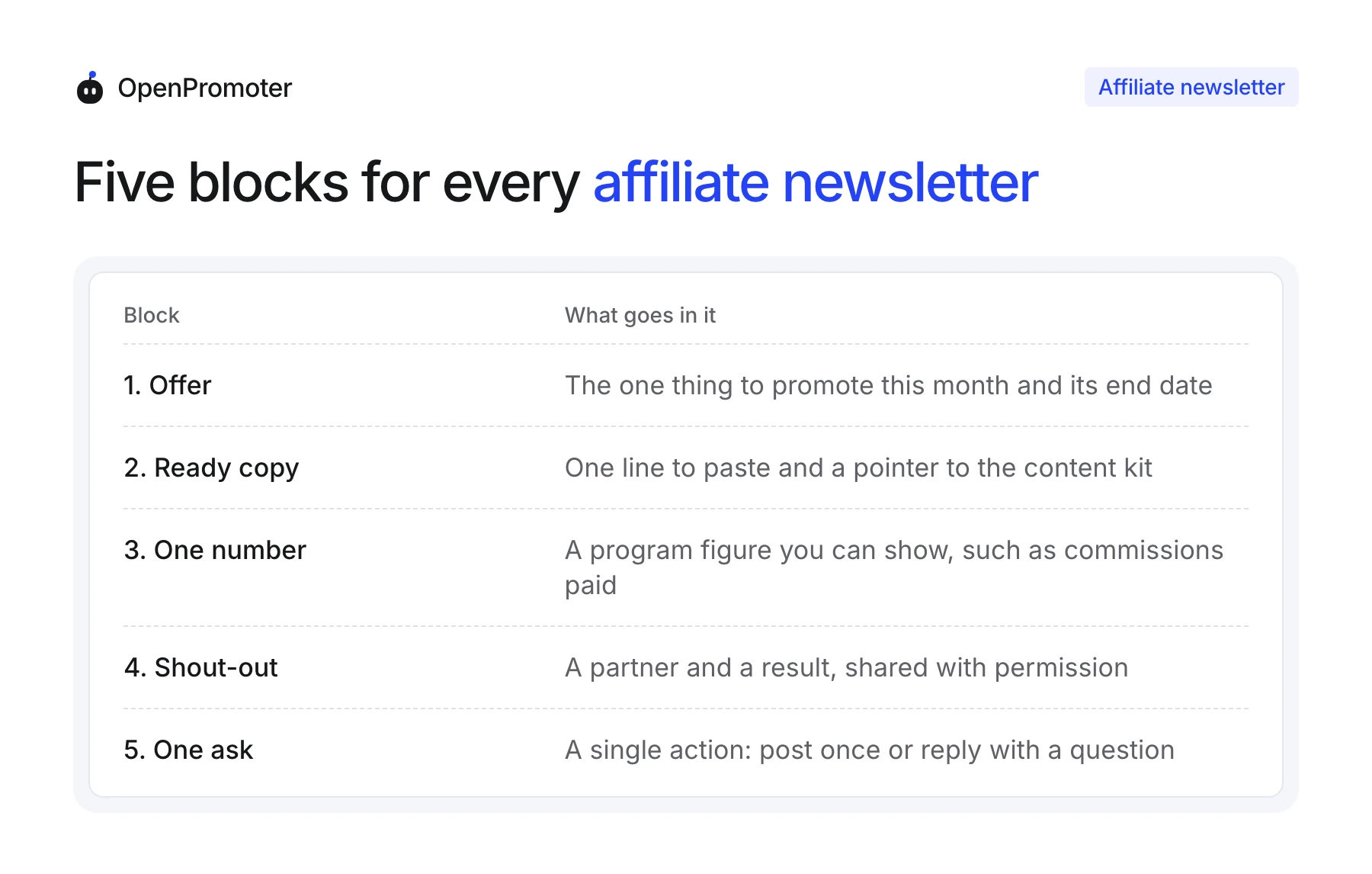
- Offer and deadline: The one thing partners can promote this month, such as a plan boost or a discount. Give the date it ends.
- Ready copy: One line partners can paste. Point them to the content kit, where each piece already holds their own link.
- One number: One program figure you can show, such as commissions paid last month. Skip any number you cannot back up.
- Partner shout-out: Name a partner and a result. Ask before you do.
- One ask: One action, such as posting once this week or replying with a question.
A shout-out works because it shows partners what a good result looks like. Name the channel, such as a newsletter issue or a video, and the result. Partners learn which kind of post pays.
Keep one topic per issue. Four offers in one email give partners four reasons to do nothing.
Tip: Write the subject line as the offer, for example "2x commissions on annual plans until the 23rd". It tells partners what the email holds and keeps the subject honest.
How Often Should You Send Affiliate Emails to Partners?
Send one newsletter a month and add a one-off announcement only when something has a deadline. We found no measured study of the best frequency for partner email, and this is our suggestion. Partners can turn off program messages in their portal, and too many sends gives them a reason to.
Say you run a plan boost every quarter. That is one newsletter a month plus one announcement for each boost. The total is 16 sends in a year.
Launches and holidays earn extra sends because they carry a date. Our Black Friday campaign guide shows how to plan those weeks.
A quiet month still gets its newsletter. Partners should hear from you before they forget you.
New partners need a different rhythm for their first month. Our guide on how to find affiliates includes a first 30 days plan.
What Does a Sample Partner Newsletter Look Like?
A good issue fits on one screen. It opens with the offer and its date, adds one line of ready copy and ends with one ask. The sample below is for an example product with a plan boost, and every figure in it is made up.
- Subject: 2x commissions on annual plans until the 23rd
- Opening: Annual plans pay double through the 23rd. An Elite partner at 40% earns 80% on each annual sale in that window.
- Ready copy: "I use Acme Analytics for product stats. Annual plans are on sale this week." Their link is on the Content page of the portal.
- One number: Partners earned $12,400 together last month.
- Shout-out: One partner sent 31 clicks from a single newsletter issue.
- One ask: Post once before Friday and reply with the link.
The sample holds no company news and no second offer. Each line gives the partner something to do or something to copy. A partner who reads only the subject and the first line still knows the deadline.
Do CAN-SPAM Rules Apply to a Partner Newsletter?
Usually, yes, because the FTC says the law "makes no exception for business-to-business email." A newsletter that mostly promotes offers is likely to count as a commercial message. Commercial email must follow rules on headers, subjects, your postal address and opt-outs.
This is general information and not legal advice. The FTC guide lists eight requirements. Five of them shape a partner issue.
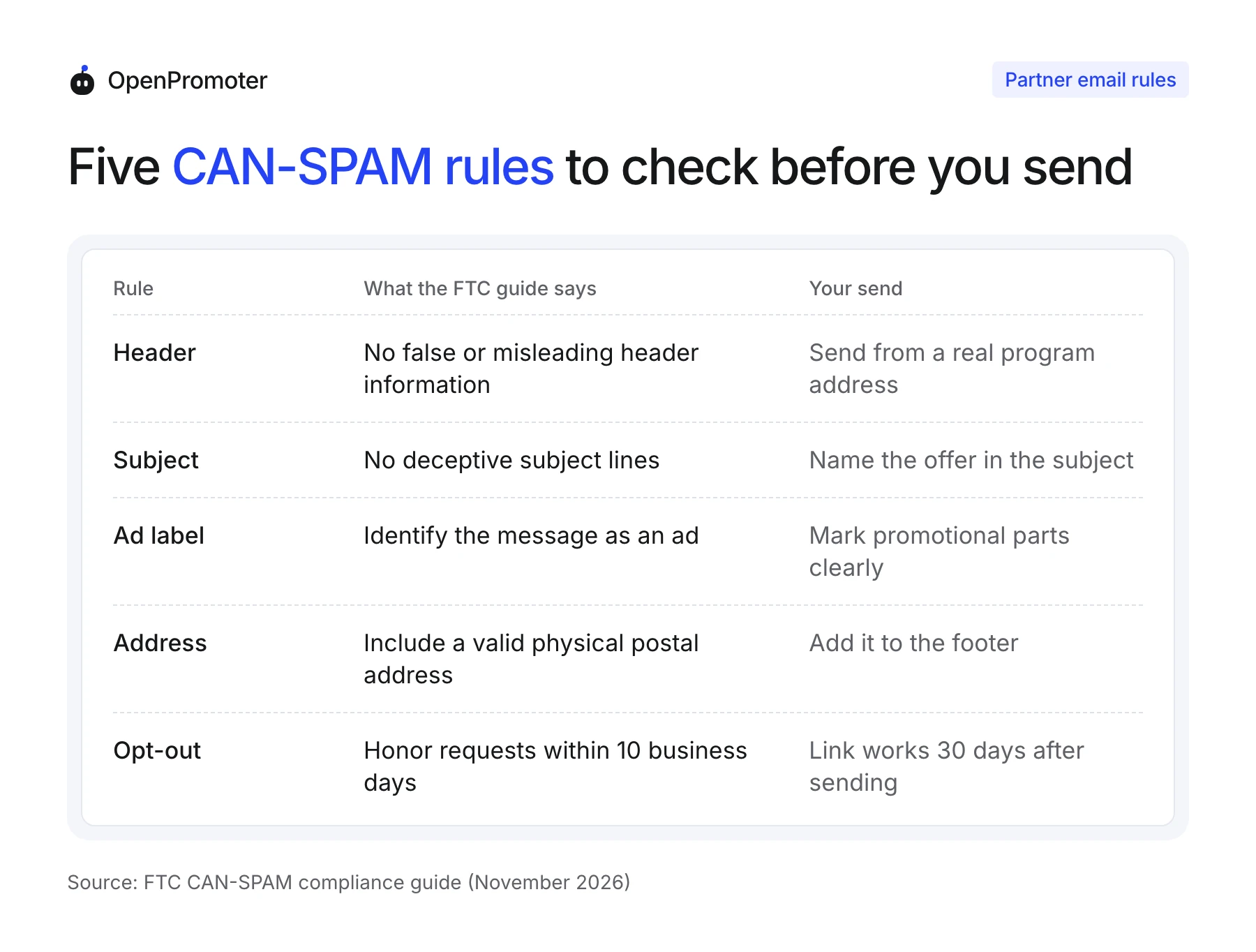
The FTC's CAN-SPAM guide also says each email in violation can bring penalties of up to $53,088. The page was edited in January 2024 for inflation-adjusted amounts.
A message about an agreement the partner already made can qualify as a relationship message. The FTC says the law "views these categories narrowly." A promotion does not fit them.
Worth knowing: Senders of more than 5,000 messages a day to Gmail accounts need one-click unsubscribe. Google also asks every sender to keep spam rates below 0.3% in Postmaster Tools. See Google's email sender guidelines.
A partner list is far below 5,000 a day. The spam-rate line still applies. Partners who never asked for your email are the quickest way to cross it.
What Open Rate Should You Expect From Partner Emails?
MailerLite's 2025 data lists software and web apps at a 39.31% open rate and a 1.15% click rate. Those numbers come from marketing lists, and we found no public benchmark for partner lists. Treat these numbers as a loose guide and compare each issue with your own last one.
MailerLite's benchmark report was published in December 2025. It covers over 3.6 million campaigns sent between December 2024 and November 2025. Its all-industry figures are a 43.46% open rate and a 2.09% click rate.
Opens tell you less than actions. A better test is whether partners did something.
Compare clicks and new customers from partners in the week after a send with the week before it. Each partner's page shows their clicks, customers and earnings.
Say you send to 40 partners. If 6 post something new in the week after, your response is 15%. Track that figure each month and aim to beat your own last issue.
How to Send a Partner Newsletter in OpenPromoter
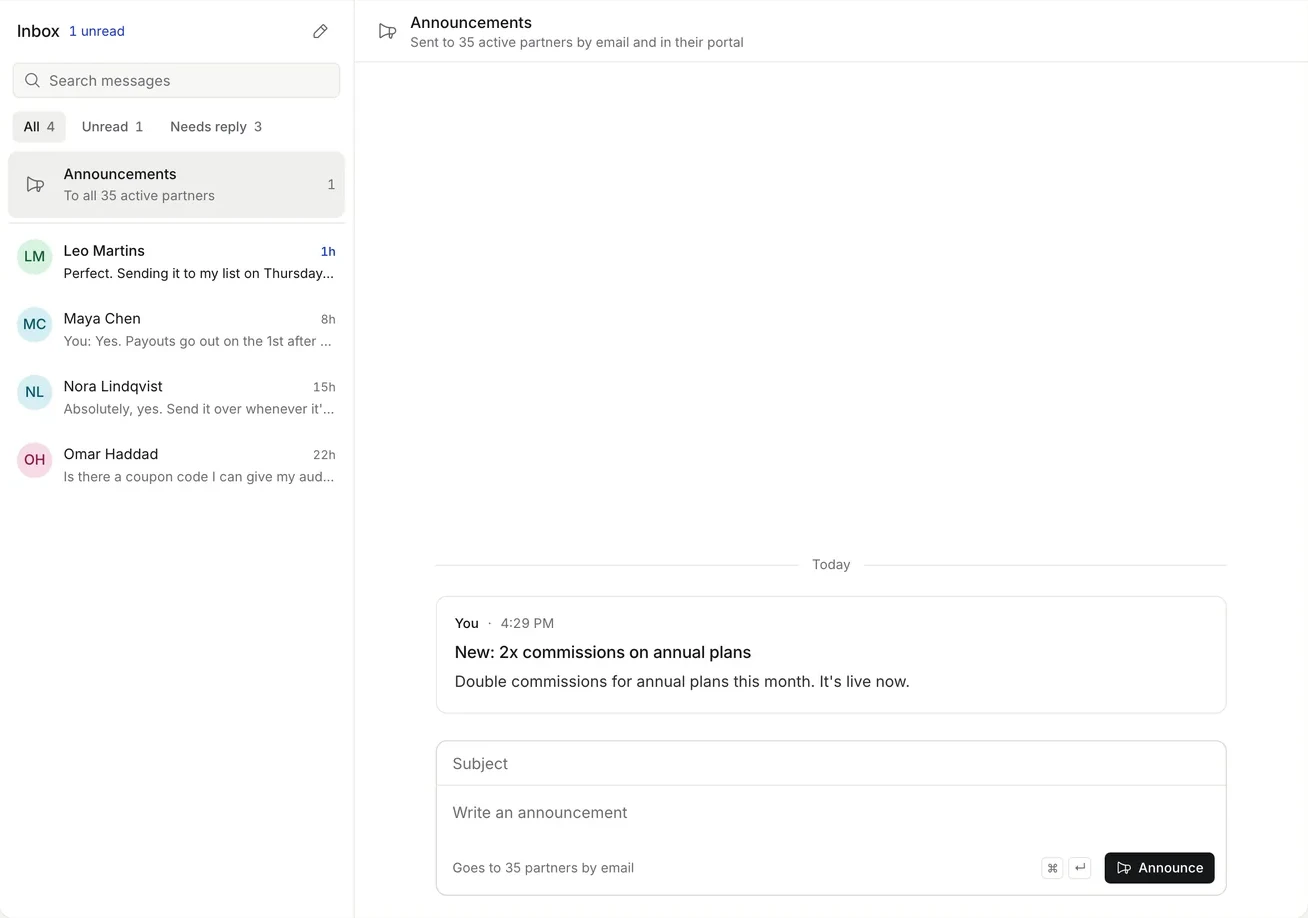
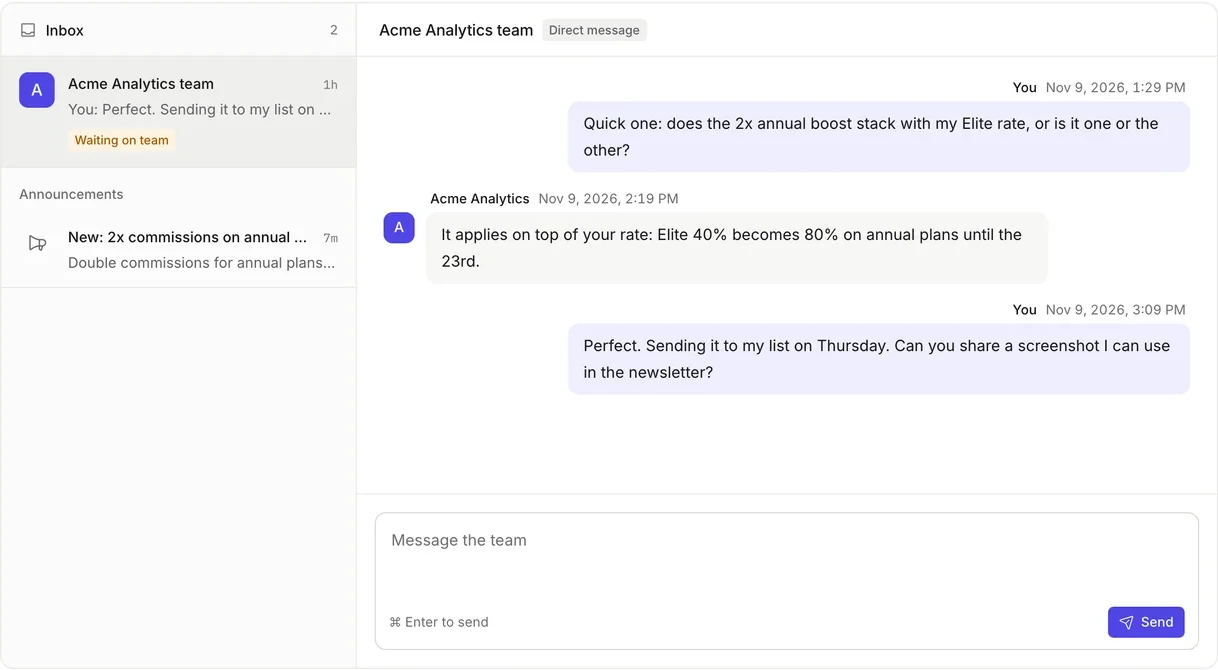
OpenPromoter sends an announcement to every active partner by email and in their portal. You write a subject and the text in Messages. Partners read the same text under Messages in their portal, and the content kit holds ready copy with their own link in place.
We make OpenPromoter and have a stake in this section. The docs on messaging partners cover the click path. Three screens matter:
- Write the announcement: Open Messages and click Announcements. Add a Subject and the text. Click Announce.
- Point to ready copy: Keep the email short and send partners to Content in their portal. Each piece there carries their own link in place of
{{link}}. See the content kit docs.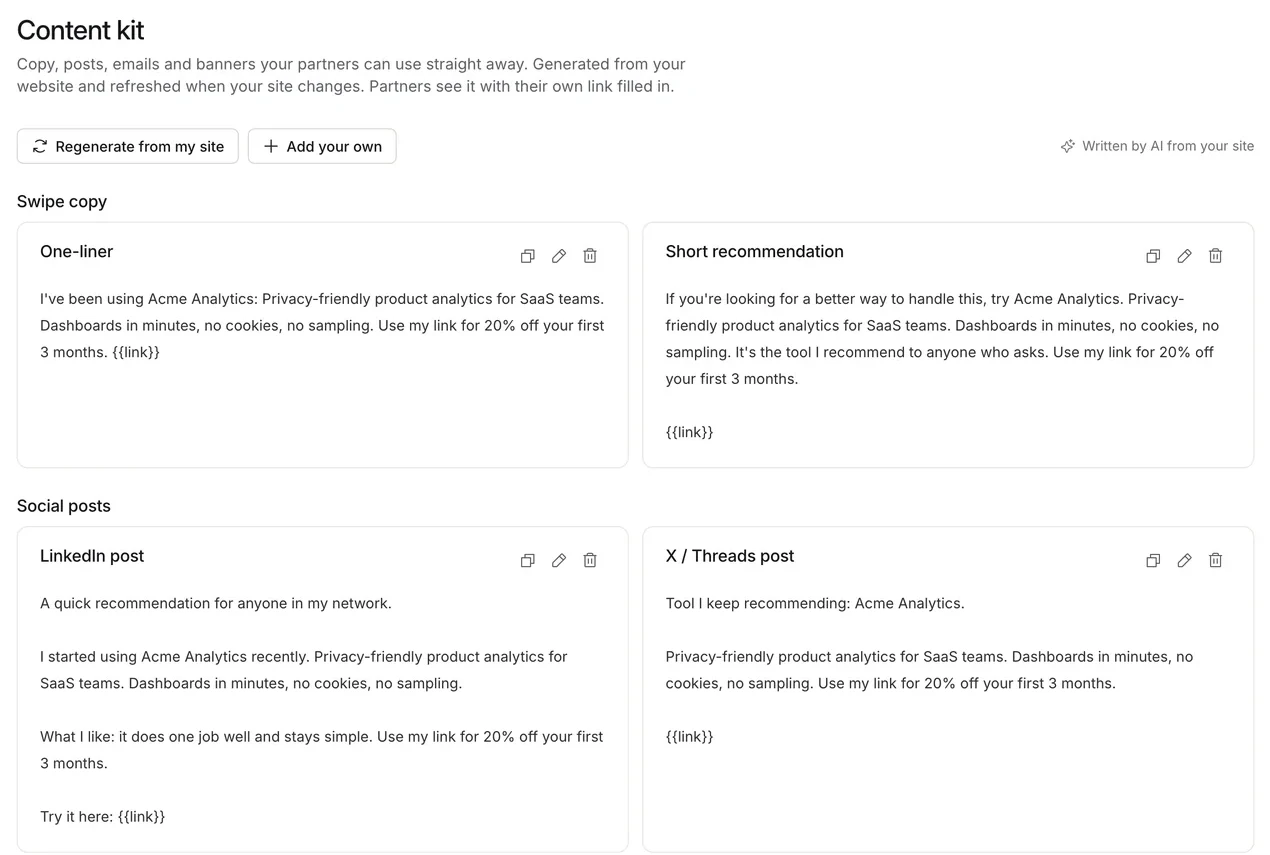
- Check what partners see: Partners read the announcement in their portal under Messages and can reply to you. Replies land in your inbox.
Launching a campaign sends an announcement for you. See the campaigns docs. The partner portal page lists what else partners get.
Five limits are worth knowing before you rely on it:
- No segments: An announcement goes to every active partner. To write to a smaller group, export the Partners CSV and use your own email tool. The CAN-SPAM duties are then yours.
- Unsubscribe built in: Each emailed announcement has an Unsubscribe link in its footer and the one-click unsubscribe headers. A partner who unsubscribes still sees the message in their portal.
- Reply address: Set a Reply-to email in Settings > Program. Without one, replies go to the program owner.
- A cap: One announcement emails up to 2,000 partners.
- No postal address line: The email footer holds the program name and the Unsubscribe link. Add your postal address to the text if your issue is a commercial message.
What Should You Do When Partners Stop Responding?
Check who has gone quiet before you change the newsletter. A partner with no clicks in 30 days needs a short personal note with one idea. Send it to that partner alone, because a longer issue will not fix a partner who stopped posting.
OpenPromoter's Autopilot spots approved partners with no clicks in 30 days. It drafts a short note that points them to the content kit. See the AI features docs for how its suggestions work.
Read replies as data. A partner who asks whether two boosts stack is telling you the offer was unclear. Answer that question in the next issue so every partner sees it.
If most of the list is quiet, review the offer. A low rate or a missing content kit hurts more than any subject line. Our guide to affiliate commission rates shows what other programs pay.
Conclusion
An affiliate newsletter works when it is short, regular and specific. Send one a month with an offer and its end date, ready copy, one number, one shout-out and one ask. Add announcements only for real deadlines.
Check the email rules before the first send. Add your postal address, keep the subject honest and honor every opt-out. Then measure what partners did after each issue and beat your own last result.