
Affiliate marketing tools are the software a SaaS founder uses to run a partner program. They cover tracking, links, payouts, tax forms and fraud checks. You do not need all of them on day one.
This guide comes from Google's analytics help, PayPal's fee page, the IRS instructions and WebKit's tracking rules, all read in November 2026. It also uses the OpenPromoter docs. One thing to know first: we make OpenPromoter, and our own product gets one short section near the end.
You get the five jobs a program needs and what to add at each of three stages. After that come the free tools, the costs and where OpenPromoter fits.
What Are Affiliate Marketing Tools?
Affiliate marketing tools are the software that runs a partner program from the founder's side. They record which partner sent each customer, calculate commissions, pay partners and catch abuse. Partner-side tools such as link shorteners and email builders are a different category and not covered here.
One platform often covers several of these jobs. Some founders still pair it with a separate tool for analytics or payouts. Splitting jobs only helps when each tool does its own job well.
If you are still choosing the platform itself, read our guide to the affiliate marketing platform. It covers the three kinds and what each costs.
What Tools Do You Need to Run an Affiliate Program?
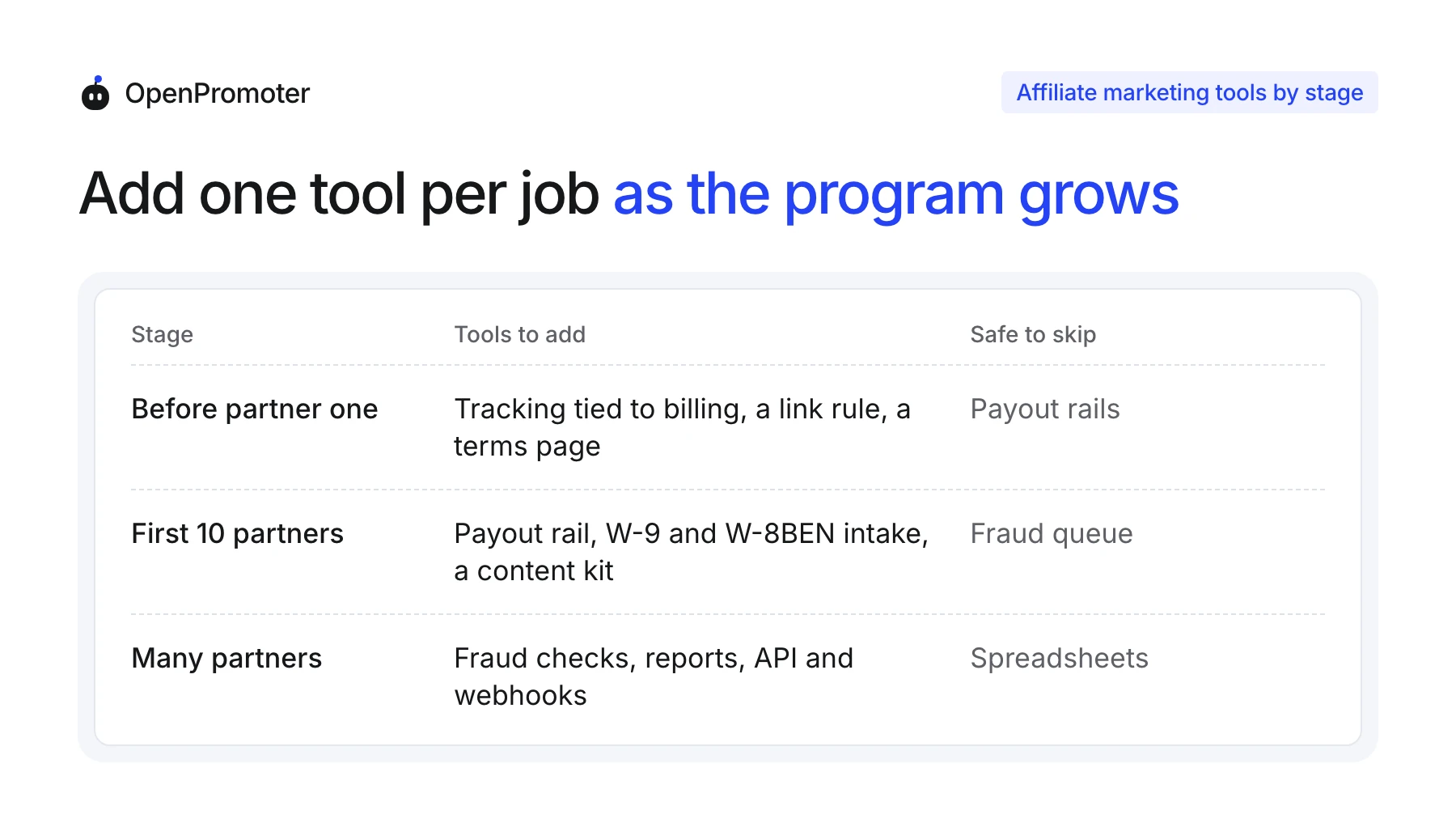
You need five tools to run an affiliate program. They are tracking tied to your billing, a link and UTM rule, a payout rail, tax form intake and fraud checks. Each one protects something different and pays off at a different stage.
| Job | What it must do | Needed from |
|---|---|---|
| Tracking | Credit each paying customer to the right partner | Partner one |
| Links and UTM | Keep link names consistent so reports add up | Partner one |
| Payout rail | Move money to partners in their own country | First payout |
| Tax forms | Collect a W-9 or W-8BEN before the IRS line | First US partner near $2,000 |
| Fraud checks | Hold commissions that look wrong | Once review by hand gets slow |
Tracking protects attribution. Payouts protect trust and fraud checks protect your margin.
Reports and an API come last. They matter once you pay many partners and want the numbers in your own systems.
Stage 1: Tools to Set Up Before Your First Partner
Before your first partner you need tracking tied to your billing provider, one rule for naming links and a program terms page. Do these first because a click that is never recorded cannot be credited later. Payout rails and fraud checks can wait.
Ask three questions of any tracking tool:
- Billing link: Does it read your billing provider's payments and reverse a commission on a refund? OpenPromoter reads Stripe and four other billing providers: Paddle, Lemon Squeezy, Polar and Chargebee.
- Server-side clicks: WebKit's tracking prevention page says Safari deletes script-writable storage after seven days without a visit. Ask whether the tool also records the click on its server.
- Click id at checkout: Does it pass the click to your checkout so a sale is credited even when cookies are blocked?
WebKit lists more caps on the same page. Cookies written by script are deleted after seven days without interaction. Cookies set through a CNAME-cloaked request are capped at seven days.
Those caps are why a click recorded on the server and carried to checkout is the safer design. A cookie alone can expire before a slow buyer returns.
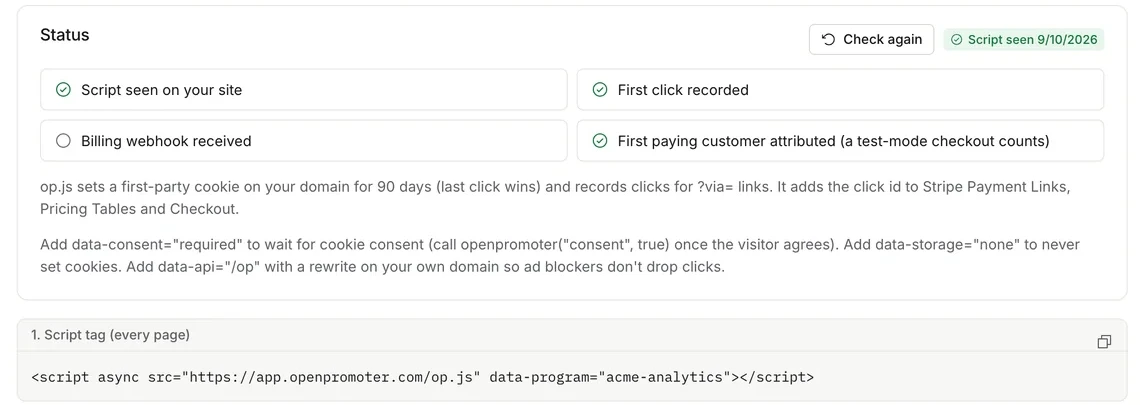
Run one test checkout through a partner link before you invite anyone. In OpenPromoter the install status counts a test-mode checkout as a first attributed customer. A test shows whether the click, the billing event and the commission all line up.
It is cheaper to find a gap now than after a real partner sends a sale. Fix it before the first invite goes out.
The terms page is the tool people forget. It says how commissions are calculated, how long the refund hold lasts and how partners must disclose their link. Our affiliate agreement template covers the clauses.
Disclosure is a legal point. The FTC's rule at 16 CFR 255.5 says a connection the audience would not expect must be disclosed. It lists the chance of being paid as one such connection.
Free Affiliate Tools You Already Have
Google Analytics 4 is the free affiliate tool most founders already run. It reads utm_source, utm_medium and utm_campaign from a referral link and shows them in the Traffic acquisition report of your property. Google's URL builder guide says to always include those three.
A link rule takes one line. Give each partner their own source value and use one medium for the whole program. A link then reads ?utm_source=maya&utm_medium=affiliate&utm_campaign=launch.
Google's best practices ask for one consistent name per campaign. That stops a single effort from splitting into several report rows. The same rule keeps every partner under one medium in your reports.
Tip: Decide the medium once and never vary it. One filter then shows all partner traffic.
OpenPromoter's redirect links pass UTM values through to your site and store them on the click. The tracking docs show how sub-ids work for tagging a single post or video.
Stage 2: Tools to Add for Your First 10 Partners
With your first 10 partners you add three tools: a payout rail, tax form intake and a content kit. Partners ask about money first. The rail comes first and the other two remove work you would otherwise repeat by hand for each partner.
The payout rail decides cost and reach. PayPal's fees page (updated October 14, 2026) says the sender pays a fee that is usually 2%, with a cap that varies by country. The funding account must hold the payout total plus the fees.
Say you pay 10 partners $150 each. That is $1,500, and 2% comes to about $30 before any cap. Our PayPal Payouts guide works through limits and failures.
PayPal does not fit every partner. OpenPromoter's docs note that accounts in some countries, India among them, cannot send PayPal Payouts. Wise, Stripe Connect or a manual bank transfer covers those partners.
Tax intake comes next. The IRS says the reporting threshold for payments made in 2026 is $2,000. It may be adjusted for inflation from 2027.
A partner who earns $200 a month reaches that line in October. Collect the form before it happens. Our 1099-NEC threshold guide lists who gets a form.
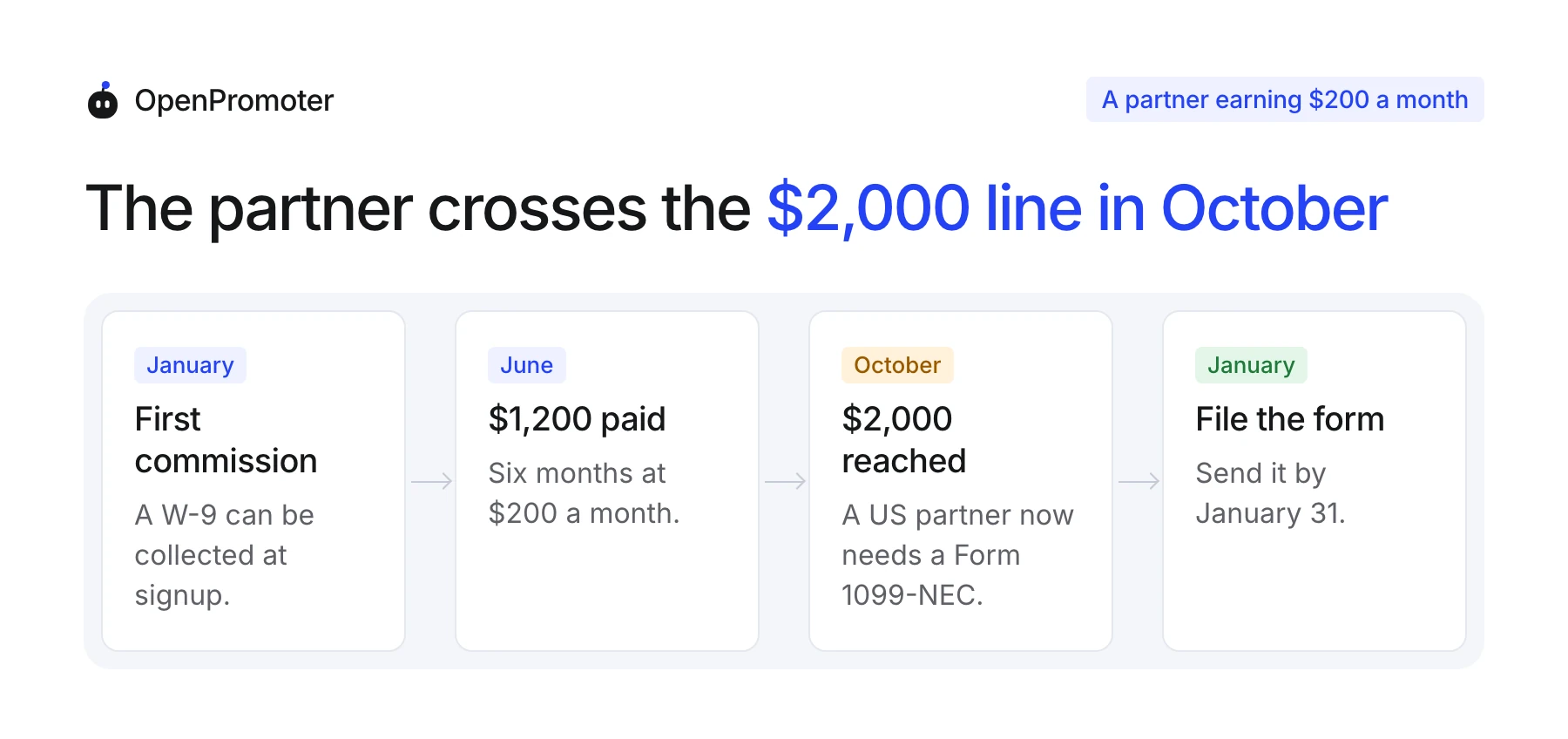
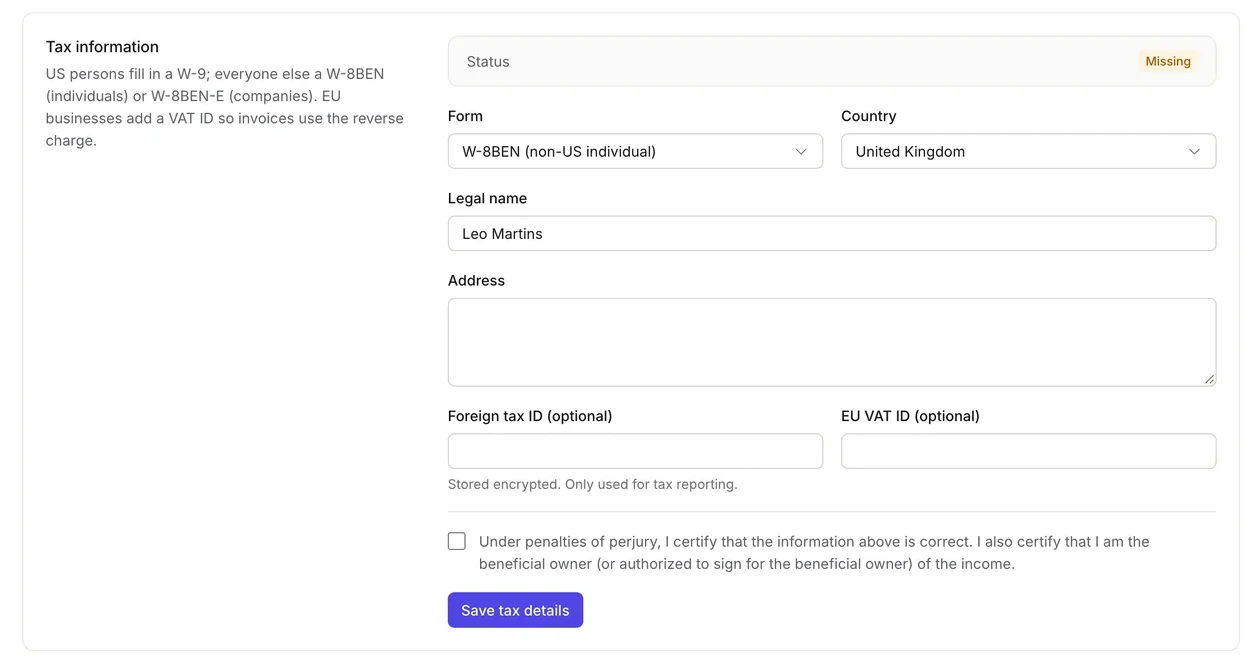
In OpenPromoter a US partner paid outside Stripe adds a W-9 under Settings in the partner portal. The tool needs it on file before the partner passes the reporting limit. Until then the payout fails with a clear message.
The third tool is a content kit. Partners promote better when they get ready copy, posts and banners with their link filled in. OpenPromoter writes the content kit from your website after setup.
Each piece carries a {{link}} placeholder that becomes the partner's own link. You can add your own pieces and regenerate the kit after a pricing change. Without an AI key the kit is built from templates filled with what is on your site.
Stage 3: Tools to Add Once You Pay Many Partners
Once you pay many partners you add fraud checks, reporting and an API with webhooks. Fraud comes first because a bad commission is paid out in real money that is hard to recover. Reports and webhooks matter because hand work stops scaling.
We use 25 partners as a rough marker. That is our rule of thumb and not a measured number. The real signal is the day you can no longer read every referral yourself.
Fraud checks need to look at patterns a person misses. OpenPromoter's fraud docs list 11 checks.
They include a customer email that matches the partner's own with +tag and Gmail dot variants removed. They also flag paid search ads on your brand and one payout account shared by two partners.
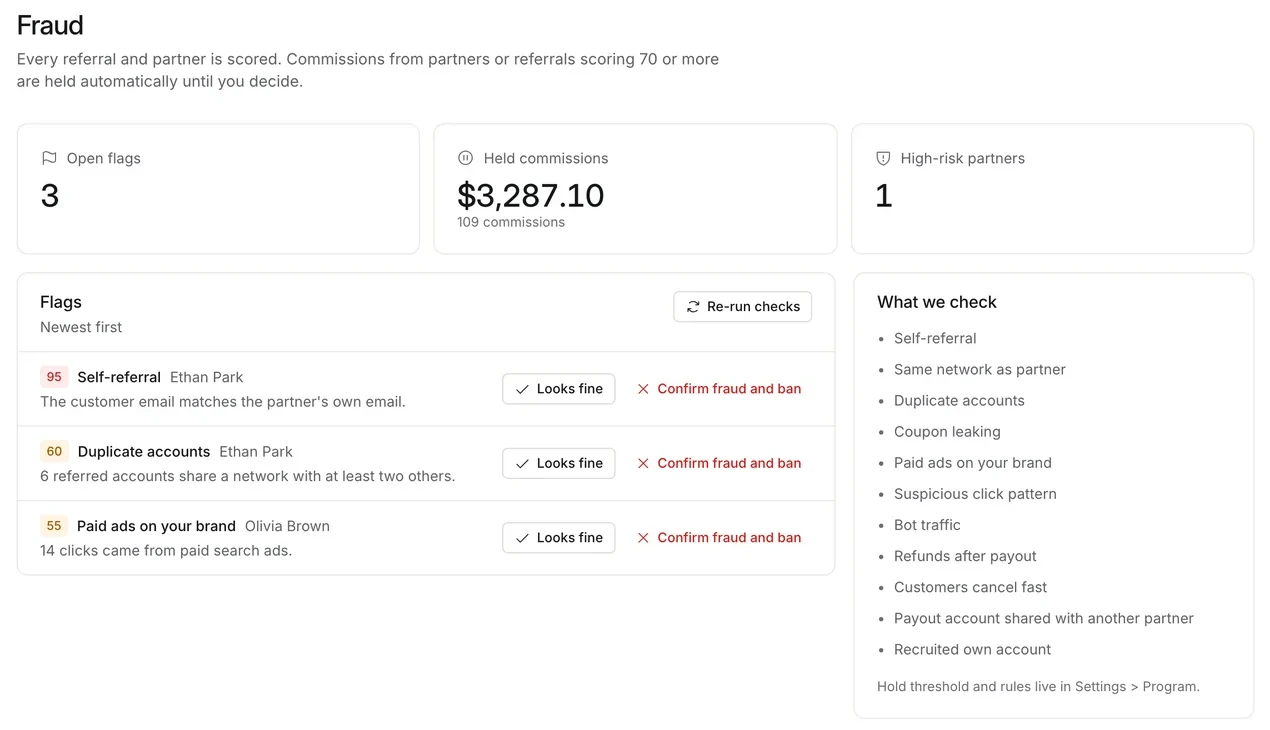
A flagged commission is held until you decide. Our guide to preventing affiliate fraud covers the schemes behind those flags.
Reporting and automation come after that. The analytics page shows EPC, conversion rate and customer lifetime value per partner.
EPC is earnings per click. It shows which partners send visitors who buy and which only send traffic. The API and signed webhooks send the same events to your CRM, Zapier, Make or Slack.
Which Affiliate Marketing Tools to Skip for Now
Buying for the stage after your own is a trap that costs money and setup time. Each purchase below makes sense later and adds cost or setup today. This list is our judgment from the stages above and not a measured rule.
- A separate fraud suite before partner one: Fraud signals need partners and sales to compare. A tool built into your tracking covers the early cases.
- A data warehouse feed: A CSV export covers reporting for the first few months. Move to the API when a person outside the dashboard needs the numbers.
- A payout API integration: An approval queue that sends one monthly run is enough for the first partners. Build against the API only when volume demands it.
- A tax filing service: Collect forms from the start and file once a year. Pay for filing help when you have forms to file.
- A second tracking tool: Two tools double count clicks and split the credit. Keep one source of truth for attribution.
What Affiliate Marketing Tools Cost at Each Stage
A flat-priced tool keeps software cost small at every stage. Rewardful lists $49 a month for up to $7,500 a month in affiliate-attributed revenue. OpenPromoter Cloud is free up to $1,000 a month and $29 up to $10,000, and self-hosting is free.
| Cost line | What it costs | Source |
|---|---|---|
| Small-program tracking tool | $49 a month for up to $7,500 in monthly affiliate revenue | Rewardful pricing (November 2026) |
| OpenPromoter Cloud | $0, $29, $79 or $199 a month by partner revenue | OpenPromoter plans |
| PayPal payouts | Usually 2% of each payout and you pay it | PayPal fees (October 2026) |
| OpenPromoter payout fee | 0% on every plan | OpenPromoter docs |
Fees on payouts are a separate line from the software price. A tool that charges nothing for software can still cost more once every payout carries a percentage. Add both lines before you compare.
Here is a worked example. Say 10 partners bring $5,000 in referred sales in one month and you pay a 20% commission. That is $1,000 in payouts.
PayPal's 2% comes to about $20 on that run. OpenPromoter Starter at $29 puts the month near $49, and Rewardful's $49 plan puts it near $69.
For a wider price comparison see our list of affiliate software alternatives.
Where OpenPromoter Fits
OpenPromoter covers all five jobs in one open-source tool, and we make it. You can self-host it for free or use the hosted Cloud plans. Weigh this section with that in mind and compare it with the other tools in this guide.
- Tracking: A script tag plus server-side redirect links. See affiliate tracking.
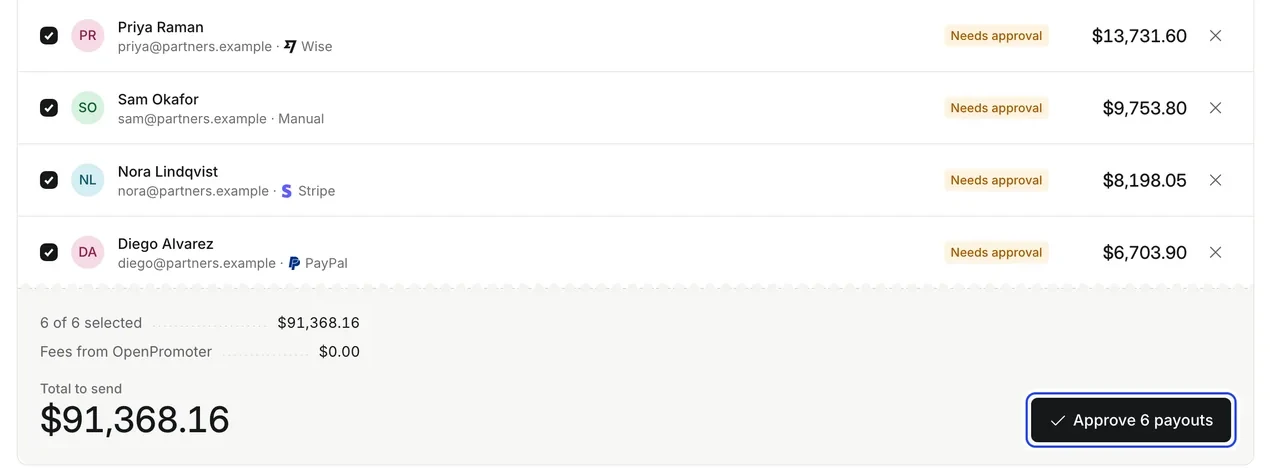
- Payouts: Stripe Connect, PayPal, Wise or bank transfer. Nothing is sent until a person approves it. See affiliate payouts.
- Recruiting: A recruiter that drafts invites, a listing in the partner marketplace and two-tier recruiting. See the recruiting docs.
- Tax and fraud: W-9 and W-8BEN intake, a 1099 report and 11 fraud checks.
- Trade-offs: Self-hosting means you run the server and the updates yourself. Cloud plans step up as partner revenue grows.
Conclusion
Affiliate marketing tools earn their place one stage at a time. Start with tracking tied to your billing, a link rule and a terms page. Add a payout rail and tax intake once partners start earning.
Add fraud checks, reports and an API when hand review slows you down. Price the software and the payout fees together. That is the number that changes as the program grows.
Pick the tool for the stage you are in now, and check that it can reach the next one.