Plans and billing
OpenPromoter Cloud plans are a flat monthly price set by partner revenue, with no cut of payouts. See the limits and AI allowance, how to upgrade or cancel, GST for Indian businesses and failed payments.
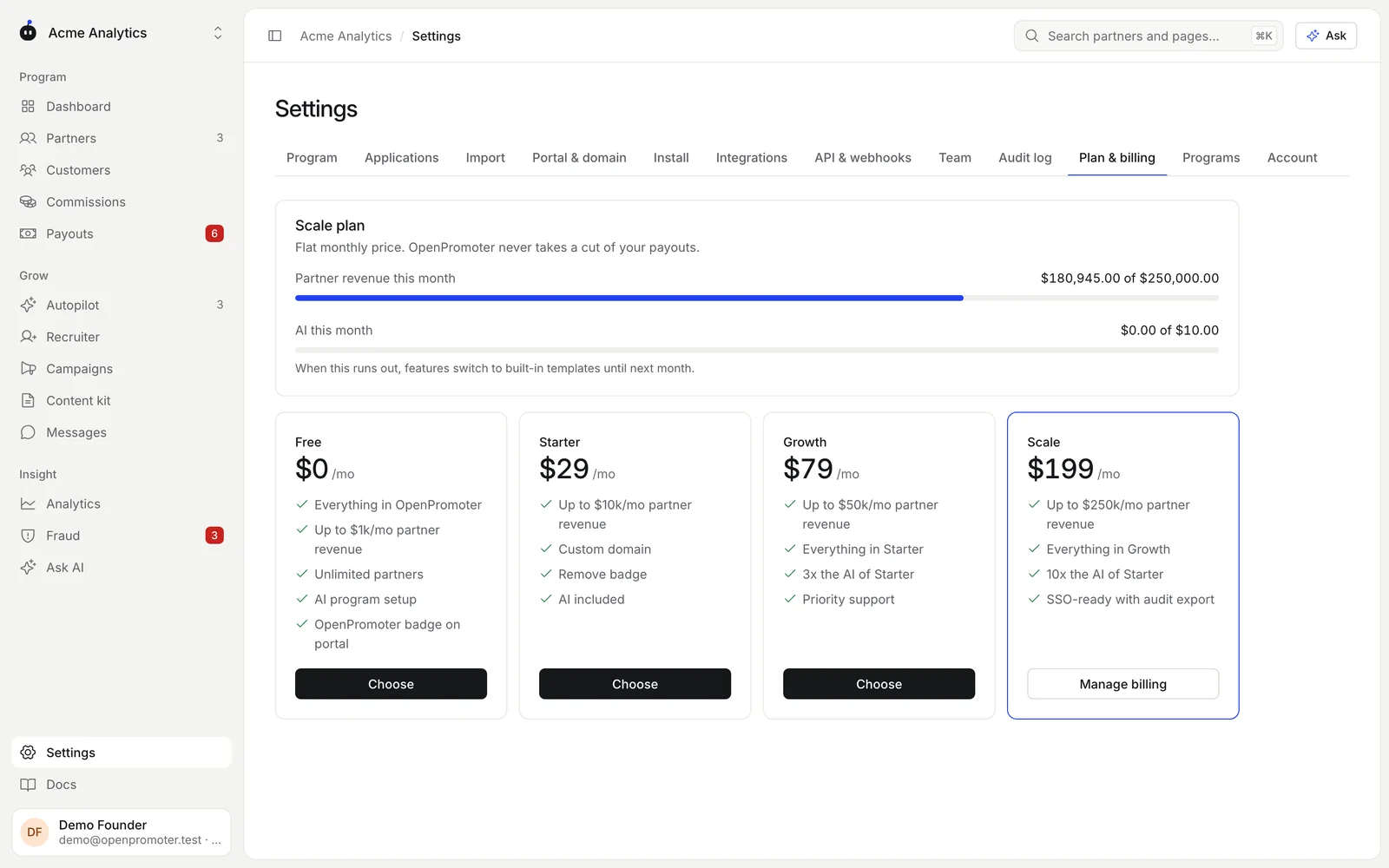
OpenPromoter Cloud charges a flat monthly price based on the revenue your partners bring in. Every plan has every feature and unlimited partners, and OpenPromoter never takes a cut of your payouts. Start on Free and move up in Settings > Plan & billing as partner revenue grows.
Plans
| Plan | Price | Partner revenue per month | AI allowance per month | Also |
|---|---|---|---|---|
| Free | $0 | Up to $1,000 | $0.25 | OpenPromoter badge on the portal |
| Starter | $29 | Up to $10,000 | $1 | Custom domain and no badge |
| Growth | $79 | Up to $50,000 | $3 | Priority support |
| Scale | $199 | Up to $250,000 | $10 | Everything in Growth with the most AI |
Prices are per month in US dollars. Taxes such as GST are added on top where they apply.
How partner revenue is counted
Partner revenue is the total of referred sales booked this calendar month, across every program in your workspace. It resets on the 1st. The meter at the top of Plan & billing shows where you stand.
Going over your limit
Nothing stops. Tracking, commissions and payouts keep working, and your partners notice nothing. The plan card shows Over limit and asks you to upgrade to stay within your plan.
AI allowance
Each plan includes a monthly AI allowance for the AI features: program design, the recruiter, the content kit, Autopilot messages and Ask AI. AI this month shows how much you used.
When the allowance runs out, AI pauses until next month. Every feature keeps working with built-in templates and rules. See AI features.
How to upgrade
- Open Settings > Plan & billing.
- Click Choose on the plan you want.
- Pay in Stripe Checkout with your card, billing address and an optional tax ID.
Your card is charged the day you choose a plan. There is no trial, because the Free plan already has every feature. The new plan shows within a minute.
Only owners can change the plan. See Team and access.
How to change or end a plan
On a paid plan, click Manage billing on your current plan or Choose on another. Both open the Stripe billing portal. There you can:
- Switch to a higher or lower plan
- Update your card
- Download your invoices
- Cancel the plan
A canceled plan runs to the end of the period you paid for. Plan & billing shows the date it ends. After that you move to Free.
Nothing is deleted when a plan ends. Your partners, links, commissions and payouts are all kept, and tracking keeps working. Choose a plan again at any time.
Invoices and GST
Invoices come from Stripe. Find them in Manage billing and in the receipts Stripe emails you. Receipts name the legal seller, DevDiggers Technologies.
Indian businesses pay 18% GST on top of the price:
| Where your business is billed | Tax |
|---|---|
| Outside India | No GST |
| India: Uttar Pradesh | CGST 9% and SGST 9% |
| India: another state | IGST 18% |
Before your first plan, Plan & billing asks Where is your business billed? Pick a Billing location and then click Choose. The question is skipped when you visit from outside India.
The address you enter at Checkout decides the tax on renewals. Add your GSTIN as the tax ID at Checkout and it appears on your invoices.
Failed payments
If a payment fails, you keep your plan while Stripe tries the card again over the next two weeks. Owners get an email, and Plan & billing shows a notice. Click Manage billing to update the card.
If every retry fails, the workspace moves to Free and owners get an email. As with any plan that ends, nothing is deleted.
Self-hosting
A self-hosted install has no plans, no revenue limits and no AI allowance. You pay your AI provider directly. See Self-hosting.
Good to know
- Payout provider fees (Stripe, PayPal and Wise) are separate and paid to them. See Payouts.
- Deleting your account cancels a paid plan on any workspace it deletes. See Team and access.
- The Free plan's badge is a small "Powered by OpenPromoter" line on your program page and partner portal.
Next: Partner guide